There are many different email account types that you can access with Mozilla Thunderbird - although you will also find that there are one or two types that you cannot view.
What Emails Can Thunderbird Use?
There are several different types of email accounts in use around the world, from POP and IMAP to Microsoft Exchange and various other less common examples. Most email clients can handle at least POP and IMAP, while others – such as Microsoft Outlook – are capable of handling almost all types of email.
However not all of us use Outlook, which means you need to choose the right email client to connect to the appropriate email account type. This means matching functionality to suitability; for instance, if you’re planning on using the popular Mozilla Thunderbird email client, you will need to know whether or not it is suitable for your needs.
Creating an account in Thunderbird is in most cases easy – all you need to add are your name, username and password and the software will detect the necessary server settings.
POP3
At one time the most common type of email account, POP3 allows you to connect your email client to the mail server and download messages to your email inbox. This then allows you to sort messages into folders in your email client.
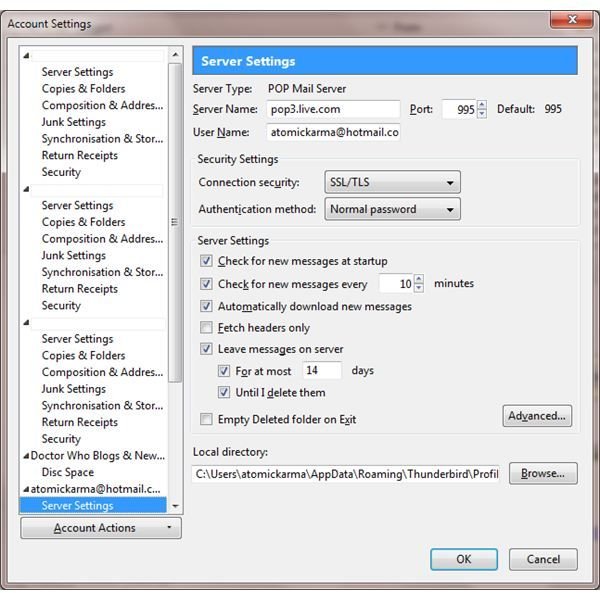
What many people misunderstand about POP3 is that when email is downloaded to your email client, the original messages can be deleted from the server. You can set this in Thunderbird via Tools > Account Settings > Server Settings – look for Leave messages on server, which you can toggle on or off depending on whether you want to keep a copy of your emails stored remotely.
Note that this isn’t as flexible a solution as IMAP, which allows you to synchronize emails and mail folders between your PC and email server.
IMAP
Alongside POP3 in the list of email types that Thunderbird can use is IMAP . Best described as a cross between POP3 and Exchange email, IMAP allows you to keep a copy of your emails on the server permanently, organized exactly as they are on your PC.
For instance if you have quite a full inbox in Thunderbird and decide that you want to add a new folder to sort some emails into, then your email server will replicate the new folder and the organization of the emails.
This has various benefits, notably the ability to pick-up your emails from any device you have access to, be it desktop, mobile or tablet.
MAPI/Exchange
Exchange email uses the MAPI (Messaging Application Programming Interface) method of mail server synchronization, allowing users to sync emails, calendars, tasks and contacts between the Exchange server and a PC or laptop running Microsoft Exchange (or suitable mobile devices such as Windows Phone or Apple iPhone).
In the list of “What emails can Thunderbird use”, Exchange features pretty low. Thunderbird doesn’t have native support for Exchange email, with only custom configurations on an Exchange server allowing IMAP or POP3 access (and low security) available.
There are ways to persuade Thunderbird to use Exchange email but unfortunately these are complicated and seem to change every few months; they also often seem to be limited to Thunderbird on Linux.
Hotmail and Browser-based Email
Although now accessible via POP3, Hotmail was for many years restricted from being accessed in any email client other than Microsoft’s own – and then only for a fee.
However in recent years as Microsoft has focused on generating a more improved selection of online services that can be accessed from “the cloud”, Hotmail has been incorporated under Windows Live.
As such Hotmail can be set up as easily in Thunderbird as any other browser-based email solution such as Gmail or one provided by your ISP.
References
Author’s own experience
Other references and screenshots: Mozilla Thunderbird web browser


