Plan out and arrange each scene of a movie before it is shot with the following storyboarding software. See what each program has to offer and determine which one is best for your project.
During the planning stages of any project, it is important to know what the goals are and what steps need to be taken to achieve them. This is particularly important in creative endeavors involving movie production and novel writing. The director needs to be able to see how a scene will play out, before he or she ever calls ‘action.’ Novelists may also plan out scenes before actually writing the story. Both projects can be greatly aided with storyboards. These are visual representations of individual scenes organized in a sequential order. Changes can be made to the order of the scenes or elements can be added into a scene before it is shot. Skilled artists would normally hand-draw storyboards, but now there are several storyboarding programs that enables most people to design their own storyboards.
StoryBoard Quick
One of the most convenient and easy to use storyboarding programs on the market is StoryBoard Quick. This software was developed by PowerProductions with the goal of giving film makers, both experienced and novice, a tool that effectively displays a sequence of scenes so that anyone viewing them could direct the film. Some of the great features of this program include the built-in library that contains numerous scenes, characters, and customizations, as well as the Instant StoryBoards, which let you print or export storyboards as graphic files or flash video. The storyboards are accompanied by script formatting and thumbnail shots, which collectively explains the ideas in the storyboard .
Price: $299.99
Toon Boom Storyboard Pro
Toon Boom Storyboard Pro is a program designed primarily for professional storyboard artists, movie directors, and game designers. There are a range of options for creating content, from brushes and strokes with individual settings, to enriched text support for captions. The settings for exporting each scene can be individually set, which allows for panel-by-panel PDF export. Two features which are definitely worth the hefty price are the intricate camera movement across a panel and full screen anti-aliasing support, which is key to smooth drawing. The software is compatible with several related programs including Final Draft 8 and Final Cut Pro.
Price: $899.99
Atomic Learning’s Storyboard Pro
Another software to consider is StoryBoard Pro by Atomic Learning . This is an introductory program that is ideal for teachers and students planning to create a digital video. It incorporates the basic tools of storyboarding including screen titles, descriptions, and sequences. Video and picture files can be imported and incorporated in each frame. Finally, print completed storyboards or blanks to guide you through the movie creation process. You can use the default template provided with the software, or you can import your own template. This software is available for free online.
FrameForge 3D Studio 2
FrameForge 3D Studio 2 is unlike most storyboarding programs in that it lets you work in a 3D environment. Easily place set pieces in a room and direct where characters stand as if you were looking down into the room and physically placing them. Move characters across the room as the sequence continues and place objects in their hands or have them take a seat. There are over 750 real world objects available in this program. Simply drag and drop set pieces to advance to the next shot. Want another angle? Simply rotate the camera to view the action in another perspective. Shots can be linked to scripts with several programs including Movie Magic Screenwriter and Final Draft.
Price: $399.95
Celtx
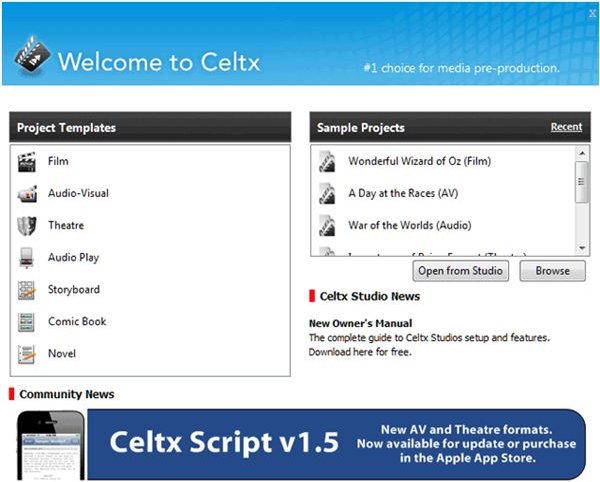
One more program to consider is Celtx. It includes a host of pre-production tools, one of which is storyboarding. Add a sequence of images to match the action in the script. Rearrange the order and add new shots to fill in the story. Preview the show by using the slideshow tool. Other tools to incorporate into the overall movie production include the sketch tool, which adds a top-down camera and additional lighting elements, and the story development forms, which guides you through scene development, props, characters, and other aspects of story development. This software is available as a free download.
The next time you plan on shooting a movie, consider using one of the storyboarding software mentioned above to visualize the scenes. If you are on a budget, try the free software from Atomic Learning. It features all the tools you need to create and print a decent storyboard. For a content rich storyboard experience, consider StoryBoard Quick. It contains a library packed with pre-rendered scenes and characters that are customizable.
References
- StoryBoard Quick - https://www.powerproduction.com/storyboard_quick.html
- Toon Boom StoryBoard Pro - https://beta.toonboom.com/professionals/storyboard-pro
- Atomic Learning’s Storyboard Pro - https://www.atomiclearning.comhig/hed/storyboardpro
- FrameForge 3D Studio 2 - https://www.write-brain.com/frameforge3d_main.htm
- Celtx - https://celtx.com/#/desktop/nav-writingtools
Image Credit - Images courtesy of the respective software developer.


