Here is a look at some of the best video editing programs for your digital video camera footage.
Cuttin’ it up
For most home digital video camera users the idea of going through a professional post-production workflow seems a little intimidating, but at this point in home video technology it is more than a possibility. There is a plethora of different digital video camera editing software packages that have released in recent years, giving you options from the most elementary up through professional grade non-linear video editing gear. Here is a look at a few of the more practical digital video camera editing software out there and what type of use it may be best for.
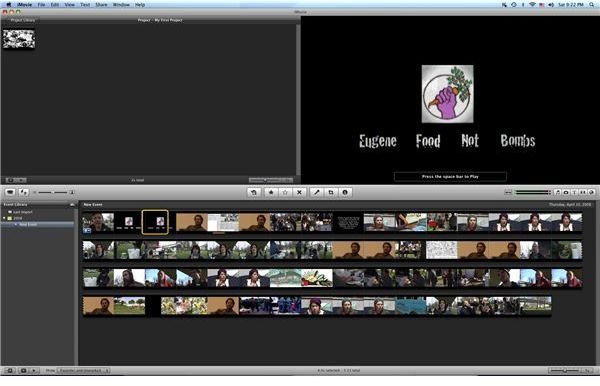
iMovie
iMovie may seem like the default for many users because it comes free with Mac computers as part of the iLife package, and that is the truth in many situations. What Apple has done successfully, however, is create a format that is incredibly easy for new users to understand. Non-linear video editing was based off the logic and language of flatbed and linear editing and through this, much of the software is difficult for non-professionals with no experience to jump in. iMovie tries to take the digital video camera editing process down a notch and base it in logic that will be easier for people shooting home videos that they want to edit together into approachable presentations.
With iMovie you will be able to edit your videos into a practical sequence, add text and photos, use video effects and transitions, and generally do all of the regular post-production that you would need for simple videos. What is really great about iMovie, in comparison to programs like Windows Movie Maker, is that it has a direct workflow with iDVD so that you can complete your DVD authoring tasks.
Final Cut Express and Adobe Premiere Elements
When moving up from the basic format of iMovie you will want to head in the direction of professional digital video camera editing software, but without the excess of features that you will not use and without the heavy price. In an effort to draw people into the more complete post-production workflows, Apple and Adobe have included simplified versions of Final Cut Pro and Premiere, respectively.
Final Cut Express , which clocks in at only $199, is often the most popular option. The reason for this is that the Final Cut format is often considered one of the easiest for newcomers to adapt to out of the professional options available. Since it holds the power to do full
service professional editing you will find that this is a great place to get started, and most of the features of Final Cut Pro are included in Final Cut Express. What you do not get, however, are the other post-production programs you get in the Final Cut Studio, such as DVD Studio Pro, Compressor , Color, and Soundtrack Pro.
Adobe Premiere Elements is the cheaper option at only $100, but is not usually as popular as Final Cut Express. The reason for this is that Premiere is not as favored in the industry, and when it is favored, the reason is because of its association with other programs in the Adobe Creative Suite like After Effects and Photoshop. Without these, the program does not stand as useful, but for the price it is one of the absolutely best options you have.
Final Cut Pro and Avid Media Composer
In general, Final Cut Pro is the best option for those who want to move into a professional post-production workflow for their digital video camera editing software. Final Cut Pro comes in at $999 and includes a complete post-production workflow with programs like DVD Studio Pro for DVD authoring and Color for color grading. Final Cut Pro is not hardware specific so you can feel free to run it on a home computer that meets its specs, as long as it is a Mac computer. This was unique when the software was first released because traditionally systems required
a computer that was specifically accustomed to the software, and since Final Cut Pro has made its way into the professional world you will find that it is going to have staying power.
At the highest end we have Avid Media Composer, a program that started out the non-linear video editing format. Because of this, it has continued to be the preferential system in Hollywood and in the feature film market in general. It still tends to have some superior tools when compared to the highest end features of Final Cut Pro, but since it is much more difficult to approach this may not be a selling point.
References
Author’s own experience.
Apple product descriptions: www.apple.com
Adobe product descriptions: www.adobe.com
Avid product descriptions: www.avid.com/US


