
Christmas Lights scrapbooking titles are fairly easy to create, and the result is something a little different that is sure to catch people’s eye. In this guide, you will learn how to create these titles using a special font and a graphics editor.
What Are Christmas Lights Scrapbooking Titles?
Christmas Lights scrapbooking titles are cute little titles that can be added to any digital scrapbook page. The reason I call these Christmas Lights titles is because the letters are all encased in a string of lights as is shown in the image to the left.
(Click any image for a larger view.)
These titles are created by using a special font. After installing the font, the only thing left to do is type the text you want and change the text options. You can decorate the titles by adding styles and drop shadows to them.
Download and Installing the Christmas Lights Font
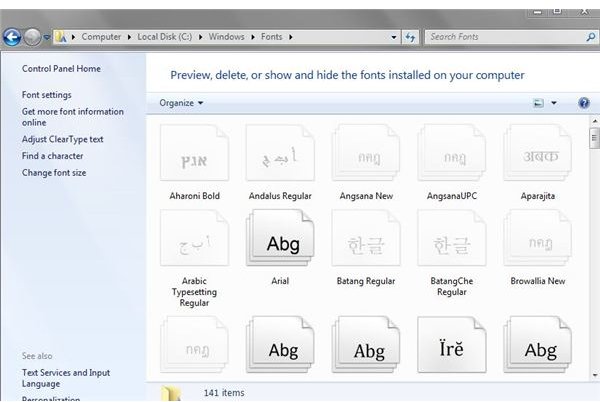
Your first step to creating the Christmas Lights scrapbooking title is downloading and installing the font you will be using. Click here to open the page with the font. Once the page loads, find the Christmas Lights font. To the right of the font, you will see the download button. Click the Download button and save the file to your computer. Save it in a location you are familiar with. It should only take a second for the font to download.
Your next step is to unzip the font file and install it in your fonts folder. Go to the location of the zip file and double click it to begin unzipping it. When it asks where you want to unzip it, click the Browse button. In the box that opens, you will need to double click your hard drive, then the Windows folder, and next the Fonts folder. Once you are inside the fonts folder, you can click the Next button to continue on. When your file has finished unzipping, the box will close and the font file will be installed.
Creating Your Christmas Lights Scrapbooking Titles
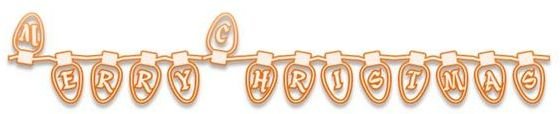
You are now ready to start creating your Christmas Lights scrapbooking titles. You will need to open the graphics editor you use. Once the editor is open, you can create the document the size you want it. Next, select your text tool and type what you want your title to say. When you are finished typing, open your font box and locate the Christmas Lights font. There will be two fonts. One of the fonts is really small, and the other font is really large. Once you find the font, click it to select it. Your text should now look like Christmas lights.
The only thing left to do now is change the color of the text, the size of the text, and apply filters if you want. You can change the text size and color to anything you want. It is probably best to use a larger font for the title so the Christmas lights will show up well. If you want to apply a drop shadow to the title you can. You can also apply other filters like sparkles or glitter. It will all depend on the program you are using and if the filters are available.
If you are using something like Photoshop, Illustrator, or Fireworks, you can use the styles to apply to the text. Some of the styles will create some cool looking text. Once you are finished, crop your title if you need to and export it out of your graphic editor. Then you can import it into your digital scrapbooking program.


