If you’d like your web site to have the look and feel of a printed publication, you can create such a page layout using HTML. Find out how to use HTML tags and tables to design the layout of your web site.
Getting the “Printed” Look Online
So you would like to create a web site from the ground up? It’s best to start with the basics and keep it simple. As a graphic designer, once you learn the basic formula on how a website is created with an HTML table, you will soon have the freedom to design layouts around almost any design concept that comes to mind. Once you have grasped the simple HTML concepts and learn to easily program your web site, then you are ready to move on to advanced DHTML. But let’s take one step at a time.
Learning HTML Tables
If you are already familiar with HTML, you will know that it is the bare programming language that is used to design a web site. We will show you an example of how to easily create a page layout with HTML. We will create 3 simple page layouts using HTML.
The most common editor used to write HTML code is right at your fingertips on your PC. You can use Notepad or Microsoft Word to program simple HTML.
Let’s begin with creating HTML web page tables. Please type the following code into Notepad.
|
My Logo
Advertisement
|
|
Left menu Item 1
Advertisement
Item 2 Item 3…
Advertisement
|
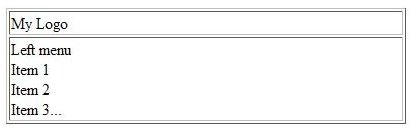
The code above will produce this layout. (Click any image for a larger view.)
Here is yet another tag called
| Title 1 | Title 2 | Title 3 |
|---|---|---|
| One | Two | Three |
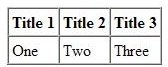
The code above will produce this layout.
If you want to divide the table into different compartments, this is where the DIV tag becomes important. This is another tag that replaces the table tag. The DIV tag groups HTML elements together such as the text and images which make up the web site. The following is an example of the DIV tag in action. You can use this for more complex layouts. Tables were not originally meant to be a complex layout tool, so this is where the DIV tag is very useful.
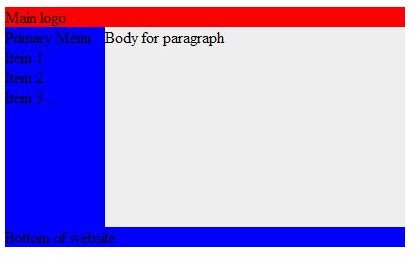
Using our previous HTML layout, we can use DIV and CSS to achieve a similar effect. The following code.
Main logo
Primary Menu
Item 1
Item 2
Item 3…
Body for paragraph
Bottom of website
The code above will produce this layout.

7 Tips for Shooting Magic Hour
Ask any photographer and they will tell you that one of the most important elements in photography is light. Magic hour …

DIY Tutorial for a Custom Wall Mural from Your Own Photo
Large format digital photo wall murals are trendy, but paying to have a mural created and mounted can be expensive …

Topaz Impression Review: Turn Photos Into Paintings, Drawings & Other Works of Art
Looking for a software application that can turn a so-so photo into a beautiful work of art? Topaz Impression promises …