Looking for an inexpensive way to make a great gift that is both personalized and useful? With Microsoft Publisher’s calendar templates, you can make a customized family calendar with personal photos and highlight the dates of important family events. This tutorial will teach you how.
Mcrosoft Publisher Calendars
The easiest way to create a calendar in Microsoft Publisher is to take advantage of the wide variety of templates that come packaged with the software. We’ll walk through this process in the following steps.
How to Create a Calendar
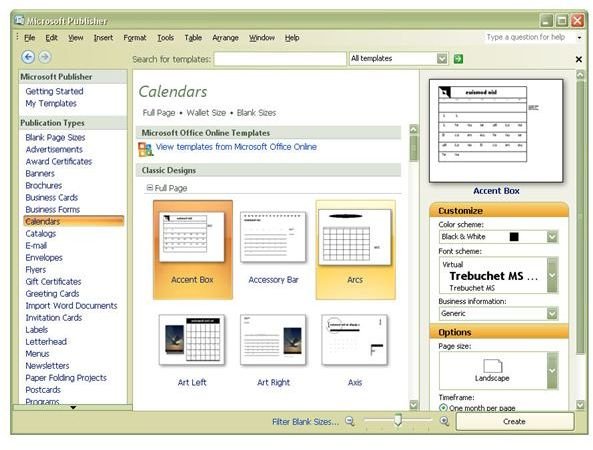
Select Calendars from the list of Publication Types in the left-hand column of Microsoft Publisher. This will bring up a series of calendar templates as shown in the screenshot below. (Click the image for a larger view.)
Before selecting a template, it’s a good idea to pick some options for your calendar. Certain options can cause a big difference in the appearance of the template layout, and entering information about these things first can prevent you from having to choose a new template later on when you don’t like the result of these changes.
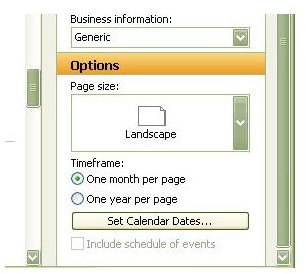
The Options categories are located at the bottom of the right-hand column of Publisher. The first category, even though it is called Page size, is really asking what page orientation you would like to use – Portrait or Landscape. Clicking on either of these options will let you view how this selection will change the appearance of the calendar templates in the middle column of the application.
From the Timeframe category, choose between having either a single month or an entire year displayed on a single page. This choice will influence the options you have when selecting the Calendar Dates.
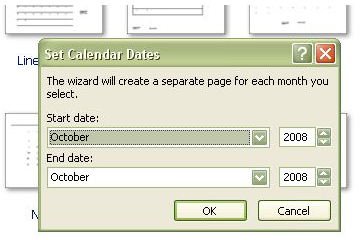
One of the nicest features about calendar templates in Microsoft Publisher is that you don’t have to worry about determining the day of the week that each month begins on – Publisher calculates all of this for you. Simply click on the Set Calendar Dates option, and you’ll be prompted for both a beginning and ending month and year. These dates will prefill in the calendar template after you click the Create button.
Once you’ve chosen all these options, scroll through the various calendar templates. All of the choices you’ve made will now be reflected in the preview window. Pick the template you’d like to use and click Create.
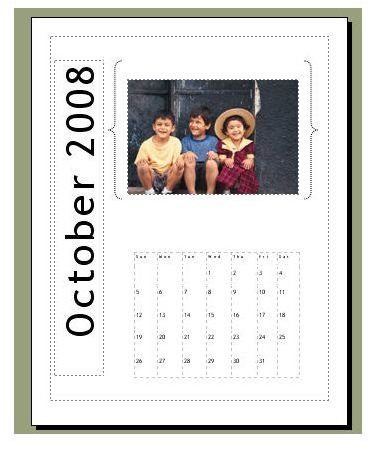
From here, you can edit the template in the same manner you would modify any other Publisher publication. You can replace the images with your own photographs, change the fonts, or modify the page colors.
To personalize the calendar, you can even go through and add birthdays, anniversaries, and other important family events to individual dates. Just click on the date that you want to modify, and start typing in your information.
For more template and resource options, be sure to check out Custom Calendar Templates and Resources for All Occasions .
This post is part of the series: Microsoft Publisher Calendars
Microsoft Publisher is an excellent tool that can be used to create calendars of all shapes and sizes. Print them on your own home system, or have them professionally published for an even more tasteful look!


