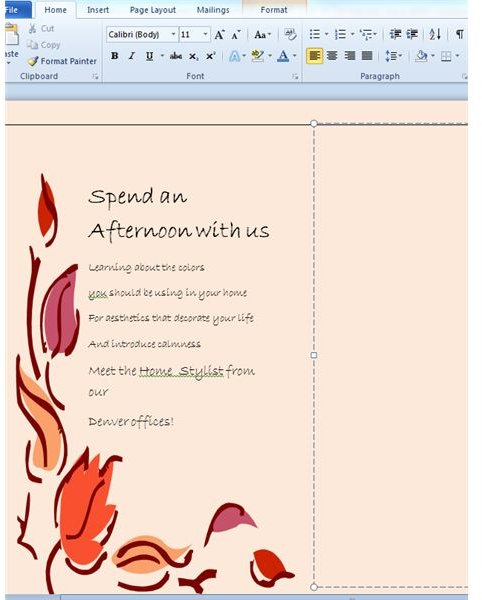
If you’re the person who loves the idea of designing and printing his own stationery suite and marketing materials, then I have lots to share with you. We’re going to assume you’ve already got your computer of choice: And so OMG—it’s time to plunge into the world of DIY DTP!
Can Anyone Do This?
What do you need when you begin your self-styled career in desktop publishing? Some people just want to make their own letterhead and business cards. Others enjoy laying out advertising circulars or creating brochures for upcoming events. You don’t have to be a Picasso if you’re aiming to describe the services that your organization offers in a trifold brochure with a few illustrations tucked in here and there.
Does the challenge of doing it yourself sound exciting? Then jump right in! There are many sophisticated programs out there, but you can get started even if you only have the most familiar Microsoft applications such as Word and Publisher.
A Word (or Two) on Software

You might want to look into various software options, and what you choose depends upon what you want to do with your computer. No matter what you end up with, it won’t take you long to learn a bunch of various tips and tricks . Adobe’s InDesign is probably the best known product, but it’s not the only one out there. If you’re looking to set up a website, you will want to investigate products such as Dreamweaver—another Adobe product. Serif’s Web Plus options for do-it-yourselfers also work well, but if you pick the cheapest free product you’ll be stuck not really knowing how to get things launched.
If you’re into manipulating photographic images, you’ve undoubtedly heard of Adobe Photoshop. You can also take a look at Adobe’s Illustrator or Inkscape for SVG work. GIMP can get you started for free, so check it out if you’re uncertain how much you want to invest at this point.
Choosing Your Printer
It really doesn’t matter what software application you’re working on: No matter how careful you are with your graphics, your work will be enhanced by choosing the right printer for the job. Just how do you go about that?
Generally speaking, inkjet printers are better for digital design and photographic printing. Laser printers, normally a little more expensive, do a great job of churning out pages and pages of text.
Some experts believe that the best printers for photos utilize a process called thermal dye-transfer technology, in which the dye is melded onto the paper with the use of heat generated by the print head. Some people like the Kodak EasyShare 5300 printers, which not only use thermal dye-transfer technology but also incorporate a fixed print head. A look at user reviews on Amazon’s website revealed a significant amount of people complaining about problems with the print head, although Kodak’s customer service has always been good. Kodak is also known for utilizing pigment-based dyes for better color and cheaper replacement cartridges.
I’m not looking to recommend just one brand or printer here. Another well-respected manufacturer is Hewlett Packard, so you might want to give the HP Photosmart 5510 a shot. You can set up your desktop with either of these workhorses for under a hundred bucks. A more expensive printer (about $300), also highly rated by lots of customers, is the Canon i860.
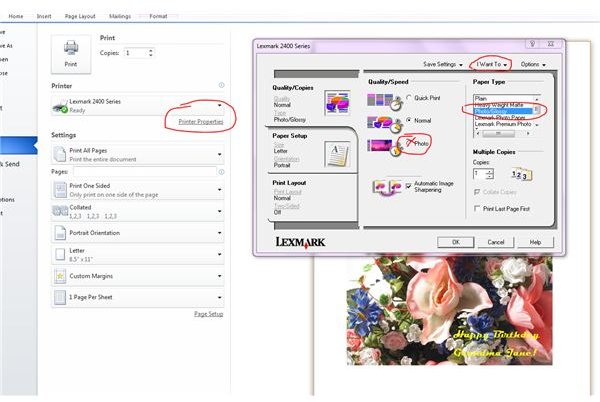
Keep in mind, no matter what printer you use, you will lose its full advantages if you don’t set it up correctly when it’s time to print. After you hit the “print” button, most programs take you to a print set-up page that, among other things, lets you click on Printer Properties. From there you can set the print quality. The screenshot taken shows the settings on my humble but very faithful Lexmark, from Quick Print (poor), to Normal, to Photo (best). If I click on the “I Want To” label, I get a drop-down window with more options.
Add a Little Ink

By the time you buy your printer, it’s almost too late to give too much extra thought about ink. Hopefully, you’ve read this section before rushing off to buy one of the printers discussed above.
My personal goal when I bought a printer was to find one that wouldn’t cost me an arm and a leg when I needed a new cartridge. The Lexmark I use is a one-cartridge printer, B&W and color all in one, and I chose it for text over images. It does a fine job at that, but I confess I email my images to someone else’s printer when I want really top-quality images.
Lexmark points out on its website just why the consumer should buy brand-name print cartridges over “generics.” Many companies that sell Brand X cartridges forego regular quality control tests as a cost-savings measure. (Of course, I read that information on a printing company’s website, so how valid is that?) I am among those who have experienced a short ink supply when you use generics. I am signed up with a members’ rewards club at my local office store, and the company also sends me coupons regularly. I earn money by recycling my cartridges. and that’s what I use to upgrade when needed.
Speaking of recycling, some people like to buy green office supplies . I would suggest using them for text-only draft documents.
There’s Nothing Quite Like Paper!
I just love the feel of paper! I like to rub it and smell it. My business class teacher way back years ago told us that every letter we typed should be centered on the paper like a work of art. That’s how I treat every document I create, whether or not it contains an image.
Just a couple decades ago, people bought bond paper containing a high percentage of cotton to use for the documents that were nearest and dearest to them. You can feel the quality when you brush your fingers on this type of paper, and in the olden days it gave an elegant presentation. It also had the handy distinction of being easily erasable. It’s unlikely that most readers here will remember the days when people carefully erased their paper and retyped over the erasure.
Today’s inkjet and even the laser printers do not work that well with bond paper. The ink bleeds into the fibers of the paper, rendering an image just a little less crisp.
The papers that we put into our printers and copy machines are pretty much one like the other. Their manufacturers rank them
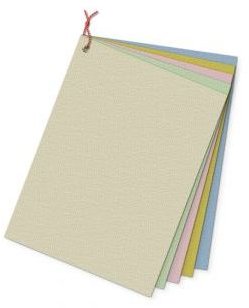
according to brightness and paper weight. Standard paper weight is 20 pound, which means that 500 sheets (a ream) weighs 5 pounds. You will note that 20 divided by 5 equals 4, and standard typing or copy paper starts out four times its normal size at 17 x 22 inches before paper manufacturers cut it down to size.
Better papers , usually higher weights (the higher the weight, the heavier the paper) have a slight coating. You can experiment by buying small packages of paper from different manufacturers and judging the paper weight, coating, brightness, and overall receptivity to ink. As with ink cartridges, you can buy cheap paper, made from unbleached fibers, yellowish and thin. For printing nice documents with or without an image—the kind of paper I would use for a newsletter but not a photograph—I like 24-pound. If you’re doing a brochure, bump it up to 65 pounds. I promise you, it will work!
Keep It Going
What kind of success are you having with your DTP project? Use the comments section below to tell me your good and bad experiences with paper and software. What problems have you encountered, and how did you solve them? Let me know if you have any problems that you haven’t been able to resolve—so we can keep the presses—er, printers—rolling!
References
-
Writer’s own experiences.
CNet. Printer Buying Guide. http://reviews.cnet.com/printer-buying-guide/
AdvertisementAmerican Forest and Paper Association, at http://www.afandpa.org/PaperProductsGlossary.aspx
Pulp and Paper Resources & Information Site.
Kodak. Printing Pictures and Pages. http://www.kodak.com/global/en/corp/historyOfKodak/printingPictures.jhtml?pq-path=2698
-
Images
Screenshots by the writer.
sxc.hu, royalty-free license , DGBurns and ambrozio


