An open source program allows you use and manipulate it - for FREE! And, the Seashore for Mac software program is no different. But, is the program worth a look? Learn more here!
About Seashore (4 out of 5)
Seashore for Mac is an open source photo editing program. Open source refers to the methodology, where you can use and change a program without having to pay a licensing fee. This software program is for the Mac OS X Cocoa framework, which is a development framework.
The open source Seashore for Mac image editor is specifically designed to handle bitmap graphics. You can add textures, gradients and anti-aliasing, which you can use on brush strokes and texts. This is a basic image editor, and you can’t use this tool for high-end graphics. But, it is free, and it’s great for quick edits.
Features (4 out of 5)
The setup of the software program is great. You can view all of your layers and when you scroll over each layer, it
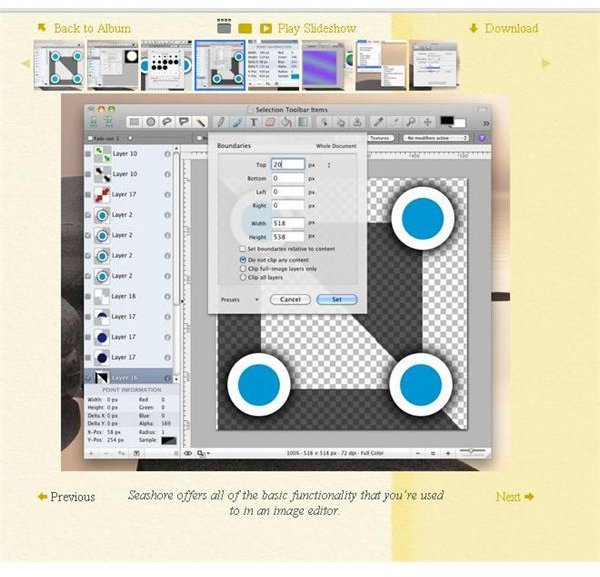
pulls up the editing box, where you can name the layer and change the dimensions, bleeding and offset. Plus, you can also easily edit each layer of your bitmap image .
Other features of Seashore for Mac include the ability to add filters to your photos, which can help improve the look or add a different feel to your photos. Further, it has a clone stamp tool just like Adobe Photoshop . This tool allows you to correct imperfections in your photo by sampling the pixels from one area of the photo and painting those exact pixels onto another chosen section.
Another standout feature of the tool is the user interface. There’s nothing intimidating about it, and anyone can learn how to use the program, whether they’re a beginner or professional.
Issues with Seashore for Mac
Seashore doesn’t have any specialized tools, including the ever popular vector tools. Another problem is the text tools. You can’t do much with them, and you don’t have a lot of control over them. Further, once you do an edit and then place the text into your image, you can’t re-edit them. You’ll basically have to delete them and start from scratch.
One other minor issue worth mentioning is that you can’t preview changes before you make them. In a world where most people are used to having this option when editing their photos, it can be a little frustrating to have to wait for the system to completely render the effect before you can see what it looks like.
Bang for The Buck (4 out of 5)
With so many free photo editing programs for Windows, it’s a nice change to have one for Mac. And, as far as editors go, this one is not that bad, especially for quick or simple edits. Plus, you can’t beat the price – free. While this program does not have the same capabilities as photo editing software that you pay for, it can still benefit the user, especially if you want to quickly experiment with your images. So, overall, Seashore for Mac well worth looking into.
You can download Seashore here .


