Blow Up 2.0.3 is a Photoshop plug-in developed by Alien Skin Software that uses a special technology to enlarge digital photos while maintaining the sharpness and details of the original image. How well does the plug-in work? Read our review and find out.
Image Enlargement with Blow Up 2

Even though Photoshop has the built-in functionality to enlarge photos, sometimes the results aren’t that great. Often, depending on the content of the photo and how much you want to enlarge it, you’ll end up with a blurred image and/or a bunch of compression artifacts.
Alien Skin’s Blow Up 2 is an automation plug-in, compatible with both Photoshop and Photoshop Elements , that uses a special algorithm designed to help image enlargements retain the clarity and detail found in the original photograph. Although there are both Mac and Windows versions of the plug-in, Blow Up 2 won’t work with other host photo editing applications – you do need a copy of Photoshop or Photoshop Elements installed on your machine. The full system requirements of the software are listed below.
System Requirements**:**
- Photoshop CS2 9.0.2 or later, Photoshop Elements 4.0.1 or later (Mac), or Photoshop Elements 5 or later (Windows)
- Windows XP or later, or Mac OS X 10.4.11 or later
- Intel Pentium 4 processor (or compatible) for Windows systems, PowerPC G5 or Intel processor for Mac systems
Ease of Use (4 out of 5)
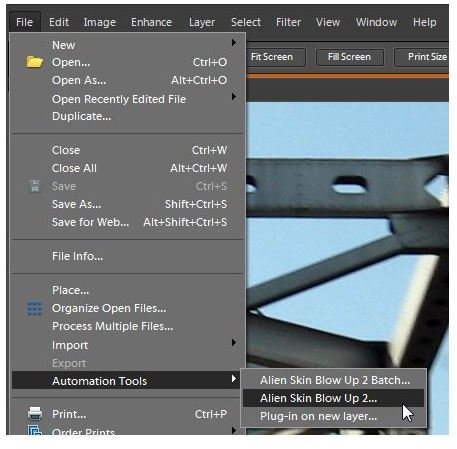
Blow Up 2 comes packaged with an easy-to-use self-installation utility so it’s quite easy to download and set up. Depending on the host editor you’re using, there are a few different ways to access the plug-in. If you’re a Photoshop CS4 user, you can utilize the Blow Up 2 Startup Panel just like any other Photoshop panel. With Version 2.0.3 of the software, you should also be able to access the plug-in from the Filter menu, although I wasn’t able to do this with Photoshop Elements 8. No matter which host application you’re using, you can find the plug-in under Automation Tools in the File menu. (See the image to the right - click any image for a larger view.)
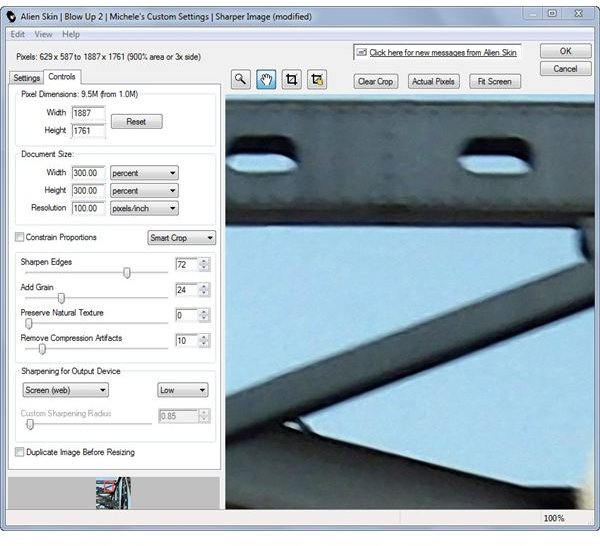
When you call up the plug-in, you can choose to apply one of several pre-formatted settings that comes bundled with the application. Alternatively, you can navigate to the Controls tab and select your own settings for the enlargement process. If you happen to find a special group of settings that you like, you can save them in the plug-in so you can use them in other photo editing projects.
No matter which option you choose, a large preview window lets you see how the resulting adjustments will look before you actually apply them to the photograph. Pan, zoom, and crop tools are included in the preview area so you can focus on those portions of the photo likely to give you the most trouble when enlarging.
On the next page, we’ll delve a little deeper into Blow Up 2’s features and performance as well as its price.
Features and Performance (5 out of 5)
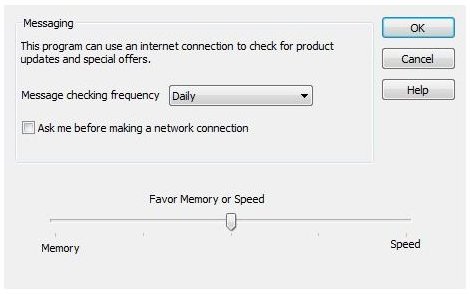
Although image enlargement can be pretty taxing on your system’s resources, Blow Up 2 actually handles itself pretty well. With version 2.0.3. of the plug-in, you can actually access a special slider from the Preferences window that lets you decide how much emphasis you want to place on memory or speed. This is a particularly nice feature for those working on systems with less memory or for those cases when you’re dealing with a particularly large image file.
Blow Up 2 is capable of obtaining results that are much better than Photoshop’s bicubic enlargement method, even on digital photos with relatively minor resizing. The image below shows the results of enlarging an by image by 300% – the photo on the left was resized using Blow Up 2 and the one on the right was resized with the built-in bicubic option found in Photoshop and Photoshop Elements.

Not only did the Blow Up 2 enlargement result in sharper edges and details, but it also is lacking most of the ugly artifacts seen in the bicubic enlargement.
Price to Value (4 out of 5)
While Blow Up 2 can give some amazing results, the retail price of $249 is a bit prohibitive for the causal user. However, if you regularly need to resize photos and are having trouble maintaining crisp, clear edges and sharp details, the plug-in is definitely worth the investment. A demo version of the software is available from Alien Skin if you want to try it out first.
Overall Rating (4 out of 5)
In terms of performance and functionality, Blow Up 2 is certainly one of the better Photoshop plug-ins on the market. It is easy to use, manages memory well, and gives excellent results when enlarging photos – no matter what type of image you’re editing. It may be a little on the high side in terms of cost, but if you’re often required to produce high-quality photo enlargements, it could pay for itself in no time.


