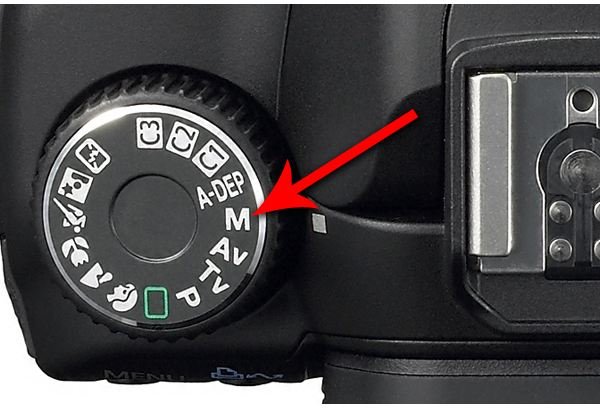
Using the manual mode on a digital camera is something that every photographer must eventually master if they are to truly excel at their craft. Though not always necessary in other situations, portrait photography offers as great opportunity to learn and use manual mode.
Manual Mode Settings for Portraits
In a lot of situations, the manual mode can actually be an impediment to getting the shot. That is because the time it takes to make adjustments to the settings can cause a photographer to miss a great shot. However, in the portrait studio, photographs are taken with a willing subject who can be instructed to remain in a certain place and position. Furthermore, the lighting will remain constant which means that once the settings are in place, there won’t be much call to adjust them.
Even with the camera set to manual mode, you won’t be on your own. Most cameras will notify you if the aperture and shutter speed combination you have chosen will result in an underexposed or overexposed shot. In Canon brand DSLRs, this is often indicated by flashing either the aperture or shutter speed setting display in the camera view finder. Determine how your camera communicates such information and watch for it during your session.
Aperture and Shutter Speed
For a given shot, there can be multiple combinations of aperture and shutter speed which will provide a “correct exposure”, that is an exposure which is neither over nor under exposed. Choosing which combination is an important step in a great digital photography portrait.
If you are working with a seamless background without design elements (no swirls or “blobs”) then you won’t have to worry so much about blurring the background. In this case, the apertures surrounding f/8 seem to provide a clear picture of the subject without bringing too much of the background into focus. Set the aperture to f/8 and then set the shutter speed to around 1/125 sec. If you are shooting children or pets, who are more likely to move, then try a faster shutter speed. Take a test shot and evaluate your settings. Pay particular attention to the background (is it too focused) and the hair (is it in focus the whole way back). Adjust your settings and re-examine the test shot until you have it just right.
Remember that with a fully manual setting, it is necessary to adjust both the shutter speed and the aperture each time you make an adjustment to either. Many cameras will help with this need by “suggesting” the corresponding setting once you have chosen the other setting to the one that matches. However, if you are just going to use this combination then you are probably better off using the semi-manual modes instead.
Next Up: Check Out Part 4 Below: General Camera Settings for Portraits for Semi-Pro Photo Shoots.
This post is part of the series: Semi-Pro Photography - Taking Pictures of Friends and Family for Profit and Fun
Sooner or later, people are going to notice that you are good photographer. When they do, they’ll want you to photograph them and their events. By building up your skills as a semi-professional photographer, you can earn money and develop your craft. If along the way you become full pro, great!
- Semi-Pro Photographer – Shooting Portraits of Friends and Family for Profit and Fun
- Semi-Pro Photography - Photographing Friends and Family in Portrait and Semi-Manual Mode
- Using Manual Mode for Portraits
- General Camera Settings for Portraits for Semi-Pro Photo Shoots
- Posing Subjects for Digital Photography Portraits Tips


