Don’t let posterization ruin your photographs. Understand what it is all about, so that you can learn to fix it and prevent it.
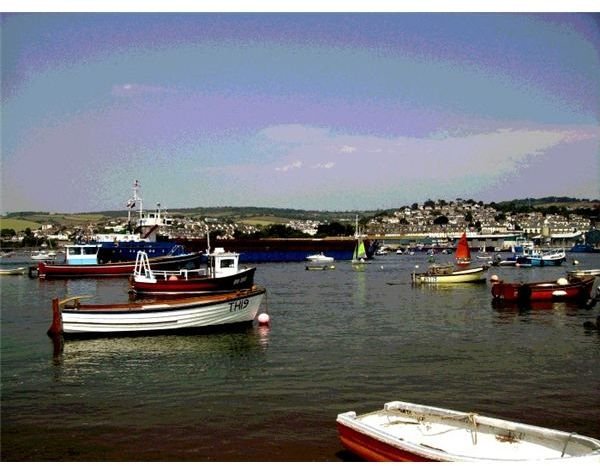
Posterization, sometimes also referred to as “banding” or “false contouring”, is an unpleasant visual effect that makes certain areas of a photograph (especially gradients) lose their original smoothness and appear as a series of bands or segments of color. The effect was common to the graphic mass-produced posters, hence the name “posterization”. Posterization is explained by insufficient color depth and can have various causes: the conversion of the original RAW image to a format that uses a limited number of colors (such as GIF or 8-bit JPEG), extreme JPEG compression rates, underexposure, excessive editing, etc. Posterization can be also created deliberately for artistic purposes in most photo editing programs.
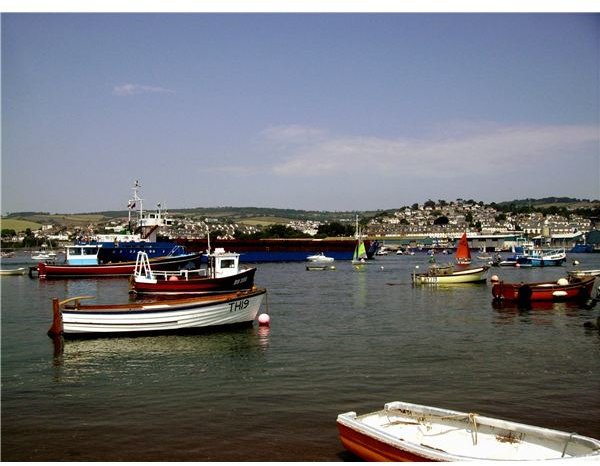
In the images below you can see the same photo before and after posterization.
(Click on images to enlarge)
Before & After Posterization
So What Exactly Happens?
The transition from one color to another is a very subtle process. In a photo that appears smooth and natural, the color gradually changes by passing through several tones (levels of intensity), so that its edges are kept invisible to the human eye. In a gradient, you shouldn’t be able to detect where a tone ends and where the other starts. However, when we deal with a reduced color palette, we lose some of the required color information, which makes this transition impossible. Each color has an intensity value ranging from 0 to 255. When values within this range become unavailable, colors are forced to “jump” from one to the other without the intermediate tones that create the smooth effect. These gaps between color levels can be perceived by the human eye as color bands with distinct edges. This is what we call posterization.
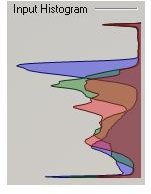
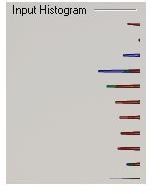
Posterization can be easily detected in a color histogram , where it is represented as spikes or gaps between the tones. In the following images, you can compare the histogram of the two photos above (when there is no posterization and after the posterize filter has been applied).
Histograms
Ways To Prevent And Fix Posterization
To prevent:
- using 16-bits or 24-bits channels instead of 8-bits channels can reduce the risk of posterization, since they provide much more color levels. 8 bits is not enough to allow smooth transitions.
- shoot your images in RAW rather than JPG and convert them to a high bit format. Not recommended formats: GIF, 8-bit JPG. Recommended formats: TIFF, 16-bit JPG.
- save your photographs in a lossless format that allow you to do several editings without the damage done through JPEG compression.
- when editing, use adjustment layers (in Photoshop)
- when editing, use Brightness/Contrast instead of Curves to avoid modifying the histogram.
To fix:
- use dithering (a photographic technique that creates the illusion of color depth)
- add image noise in small quantities to the damaged areas in order to mask the edges of the bands and make them invisible to the eye.
- you can download a Photoshop plug-in to repair posterized histograms.


