If you’ve seen the ads for Microsoft Songsmith or have just heard a basic description of the software, you may not be aware of all the capabilities available in the digital music application. This review concentrates on Songsmith’s features that make it a viable choice for music composition.
What Can Songsmith Do?
While there are some great free audio mixing and editing tools available, it’s hard to find a budget-friendly application for basic music composition that’s both quick and easy to use. I’m a big fan of Anvil Studio , and though that program can be used to compose music, the process is a bit cumbersome if you’re trying to do everything digitally and create each track, note by note.
When I first heard of Songsmith , the description sounded like some sort of Karaoke program and I wasn’t very interested. But, after not having a lot of luck finding what I was looking for in other applications, I decided to give Songsmith a try.
The basic premise of Songsmith is simple. You press a record button and then sing, hum, play an instrument, or make some other form of noise into a microphone. When finished, Songsmith creates the musical accompaniment for that recording. Then, you have the option of editing that composition by changing the style, modifying individual chords, or even substituting different instruments. In the end, you can create a completely unique digital composition even if you don’t know anything at all about writing music or music theory – of course, knowing a bit about music does help, but it’s not a requirement needed for getting good results from the software.
Ease of Use (5 out of 5)
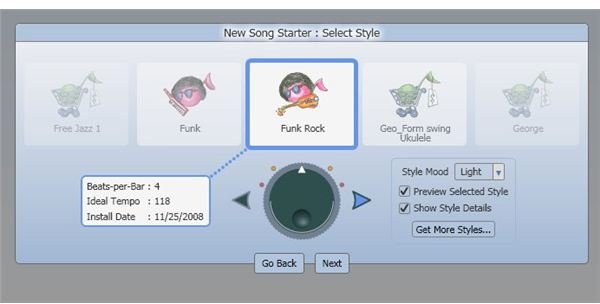
One of the strongest points in Songsmith’s favor is that the software is incredibly easy to use. When choosing the option to create a new song, you’ll be walked through the Song Starter wizard that lets you select a style and tempo for your composition. It’s important to note that tempo selection is important here, since it can’t be edited later on (at least, not in Songsmith). However, you can be a little more lax about the style you choose, since that can be easily changed at any time.
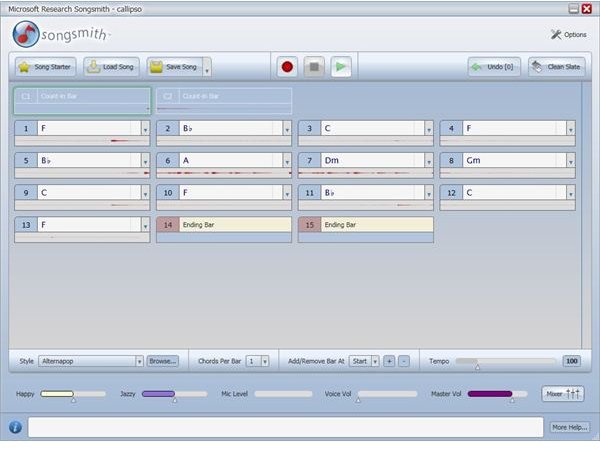
The next step is to actually record yourself singing or humming – or playing an instrument, if that’s the route you want to take. You can actually record anything you want to use as your song basis. So, if you want to compose a song based on your dog howling at the moon, this is the software that can handle the task.
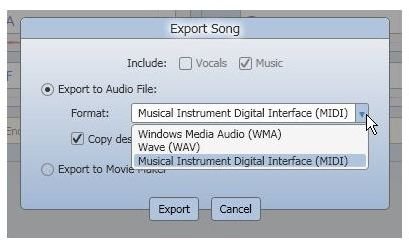
When you’ve finished recording, Songsmith will automatically generate the music to accompany that recording based on the style and tempo you selected. From this point, you can edit individual chords, change the style, manually add or remove bars, or change instrument selections and volumes. If you want to perform more advanced editing, you can export the audio file (with or without your recorded voice) to MIDI and continue your work in any application that supports MIDI files. Again, my favorite free app for this is Anvil Studio, but there are a lot of options to choose from in this area.
Features and Compatibility (5 out of 5)
Songsmith comes equipped with 30 different styles, including country, pop, and techno variations. That should be plenty to get most people started, but it is possible to get additional ones. PG Music offers some nice comprehensive style packages developed especially for Songsmith, and styles created with Band in a Box should work as well.
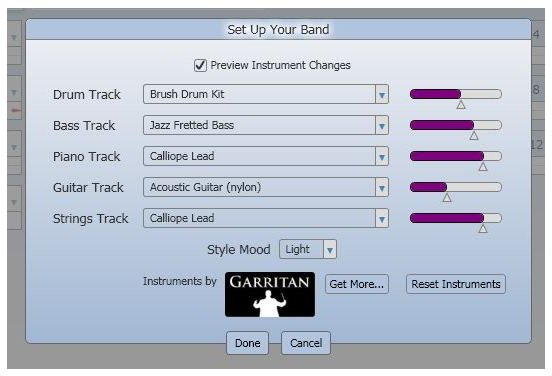
The instrument selections that come bundled with Songsmith are also fairly comprehensive, and it’s actually quite a bit of fun to experiment with all the possibilities you can get from switching out one or more instruments for different styles. If you’re interested in expanding your instrument collection, there are add-on packages available from Garritan .
However, I would like to see the option of choosing “No Instrument” for a given track instead of just turning the volume as low as possible. Although you can certainly remove a specific track after exporting to MIDI and using mixing software, it would be nice to actually have this capability within Songsmith.
When it comes to saving a song, you can save in the Songsmith proprietary format so that you can go back and edit the composition later, or you can export the song to three different formats – WAV, WMA, or MIDI – for sharing or advanced editing purposes. There is no import feature, so it’s a good idea to always save your creation in the Songsmith format to make it possible to access it and modify it again.
In addition, Songsmith can be used for commercial purposes. If you plan to use Songsmith for professional reasons, it’s good to note that any original work you create with Songsmith belongs to you . This doesn’t mean that you can hum the latest Lady Gaga tune, create different background music, and call it yours. But, it does mean that if you hum or sing your own original melody, you don’t have to worry about copyright issues with the music that Songsmith generates.
Price to Value (5 out of 5)
At $29.95, Songsmith is an extremely good value, whether you plan to just use the software as a fun “toy” or you want to use it as a starting point for creating more advanced digital music compositions.
One nice thing about Songsmith is that it does have a six-hour free trial – that’s six hours of actually using the software, not six hours from time of installation. The trial is fully functional, so you can test out everything during that six hour period, including the export to WAV, WMA, and MIDI capabilities. You’re not going to be able to compose anything major during that time frame, but the trial period is long enough to give you a pretty good idea if you’ll be able to use Songsmith for what you want to do.
Overall Rating (5 out of 5)
Considering the software’s ease of use and array of features, Songsmith is a great value and definitely worth checking out. The application is much more powerful than I thought it would be, and the MIDI export option makes Songsmith a very viable tool for getting musical ideas “down on paper.” Additionally, with the option to purchase more styles and instruments, Songsmith is a program that can grow with your needs – you don’t have to feel like you’re stuck with the same basic creative tools that come in the original bundle.


