Would you like to extract audio from your video files? Would you like to do it without having to purchase software? This article will teach you how you can extract audio from video files.
Free Video to MP3 Converter
If you want to do the occasional extraction of audio from a video clip, you don’t have to go through the hassle of purchasing expensive software for the purpose. You could use Free Video to MP3 Converter to extract audio from your video clips.
It’s a fully-functional free program. It has been tested to be free of spyware or adware .
Free Video to MP3 Converter is a 10.10MB download provided by dvdsoft.com. It works with Windows XP, Vista and Windows 7.
With Free Video to MP3 Converter you can extract audio from your AVI, MPG, WMV, FLV, 3GP and MOV files among others. Apart from MP3 as the output format, you can also extract to WAV (lossless).
Getting Started
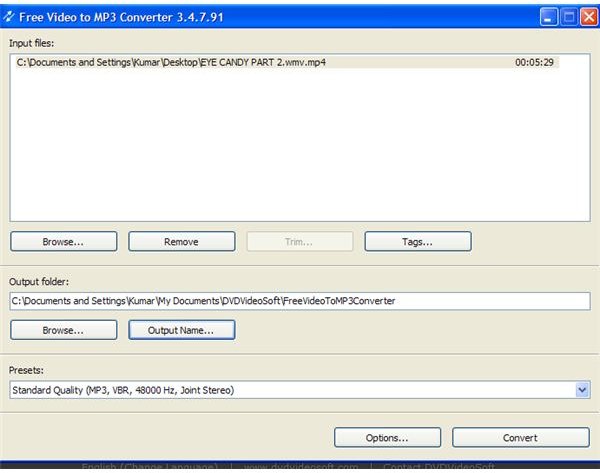
Download and install Free Video to MP3 Converter. Installation shouldn’t take you more than a few minutes. On launching Free Video to MP3 Converter, you will be greeted with a plain-looking, user-friendly interface. You can now start working with your video files by clicking on the Browse button.
Tags
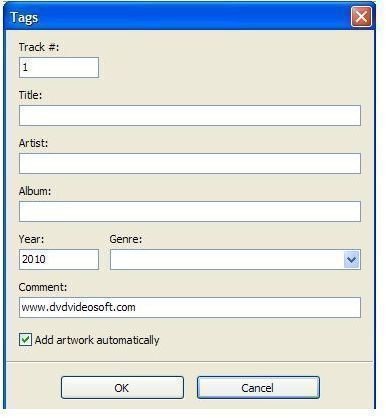
After loading the video file you would like to convert, you could proceed to insert tags for the output audio for future identification. You do this by clicking on the Tags button and insert Track Number, Title, Artist, Album, Year, Genre and Comment details.
Output Options
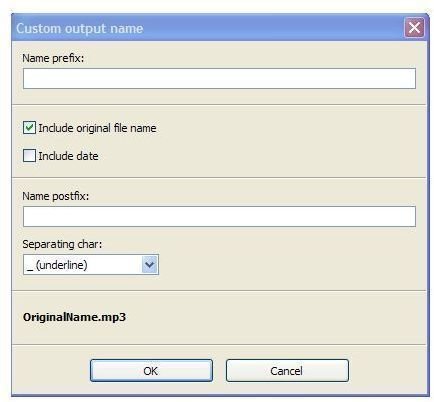
Once you’re done with the Tags information, you can set the output folder where the converted audio file will be stored. In fact, you can do more than setting the output folder. You have options. The default output name will be based on your original file. However, you can change the name of your output file by entering a new name in the name prefix box.
You can even include the current date with your audio file if you so desire. Further, you could even insert a name postfix and separating character – underline, dot, comma, dash or space.
Output Presets
The next step before the program processes the input video file would be to set the output preset. There are presets for MP3 output and WAV Lossless Audio output. Under the Old Standard category, there are two presets – MP3, 128kbps, 441000Hz and MP3, 192kbps, 44100Hz, both in stereo. If you choose Standard Quality, then your output would be at MP3, VBR, 48000Hz, joint stereo. The same goes for the Extreme Quality preset. Insane Quality is set at MP3, 320kbps, 48000Hz, joint stereo. Finally, WAV Lossless Audio is set at 44100Hz, Stereo.
Options
If you want to extract only a portion of the audio, you can use the Trim button instead of having to use an audio editor . Click on the button and a new window pops up for you to mark the start and end points for the audio extraction. Once you’ve set your markers, you click OK and you’ll be brought back to the main window. Then all you would have to do is hit the convert button and you’re ready to extract audio from your video clip.
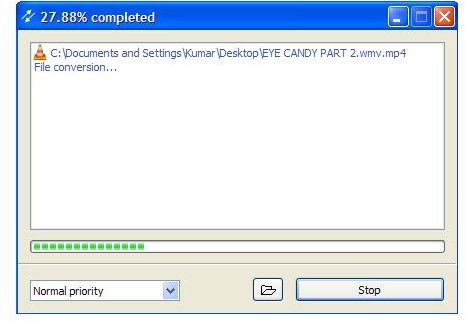
You can also have the computer shut down after conversion is complete by hitting the Options button. This is especially useful if you’re doing batch conversion and leaving your computer on overnight.


