Designed for Sony Ericsson Xperia Windows Mobile phones, this YouTube app is a great way to browse and enjoy streaming content from the popular video sharing website to your Windows Phone
Quick Launch YouTube Panel
X-Panels are a great way of quickly launching apps on a Sony Ericsson Xperia X1 Windows Mobile phone.
Thanks to a handy button on the handset, the X-Panels screen can be launched, and a selection of apps are made ready to be activated. Some come as default with Xperia phones (depending on your carrier) such as the Facebook panel and the Google panel.
Others are available separately from www.sonyericsson.com/fun .
The new YouTube panel brings all the fun of the popular video viewing and sharing site to your Sony Ericsson Xperia phone – video streaming on the move!
Installation and Device Requirements
Before downloading the YouTube panel, you will need the new Panel Manager software for Sony Ericsson Xperia Windows phones. See this guide for instructions on how to do this.
The YouTube panel can only be used on Sony Ericsson Xperia Windows Mobile phones – there are other YouTube apps for standard Windows Mobile devices. Download the YouTube panel from www.sonyericsson.com/fun and install by saving the CAB file to your phone and running to begin the installation. Again, you’ll need to restart your phone after installation. (Note that this is the Panel Manager for the Sony Ericsson Xperia X2 which is also compatible with Xperia X1 devices.)
Note that with video streaming a generous data plan with your mobile network/carrier is highly recommended.
YouTube X-Panel in Action
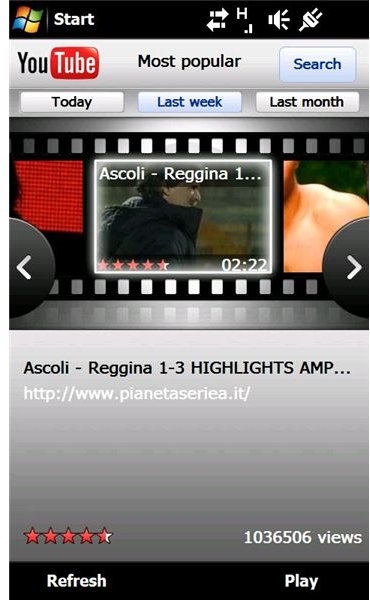
Using the YouTube X-Panel
Viewing videos on the YouTube X-Panel is as easy as using the usual desktop browser version of the video streaming website.
Using the Search function you can enter keywords for videos you want to view, while the Most Popular tab allows you to view the highest rated videos of the Last Month, Last Week and that same day.
Results are displayed in the centre of the screen and you can browse these either via the buttons or by stroking your finger across the screen.
More Functions in other YouTube Apps (3 out of 5)
Although useful and with plenty of features, this YouTube app is unfortunately not the full deal – key features such as being able to sign in to your account and view your favourites or get suggested videos based on previous visits are unavailable. Sadly there’s also no way to enter or paste a video URL or launch the panel from a link in an email.
Using the panels on the Sony Ericsson Xperia Windows Mobile phones is a great way of quickly launching applications – but unless you’re a total X-Panels enthusiast it might be worth steering clear of this.
If you’re planning on installing a lot of new panels for your Xperia then the Panel Manager update is worth the trouble – if not there are plenty of YouTube apps that are more functional and also free available for Windows Mobile devices.


