Can’t recall the name of that tune you’ve got dancing around in your head? Try singing it to your Windows Phone…
Sing to Your Phone, Buy MP3s
If you’ve ever been caught with a song lodged in your head with no way of identifying it, you should probably try Midomi.
Finally available for Windows Mobile (after some success on iPhone), Midomi cleverly identifies songs from its vast library by you singing, humming or playing the music from the radio or an MP3.
Once identified correctly, Midomi also gives you the option of purchasing and downloading the track so you can keep it – and remember its title!
This is a great example of an app performing a useful and basic task and then having a useful multimedia extension.
Download and Installation Information
Requiring a device running Windows Mobile Pocket PC 5 or 6.x, Midomi can be downloaded via FreewarePocketPC.net .
It’s a big file, just over 3 MB – not ideal for downloading directly to your Windows Phone, but if you’re planning on using the app extensively and have a generous data plan with your network provider, this shouldn’t be a problem.
The downloaded CAB file should be run on your Windows Mobile device to install the application.
Midomi Screenshots
Don’t Sing, Hum
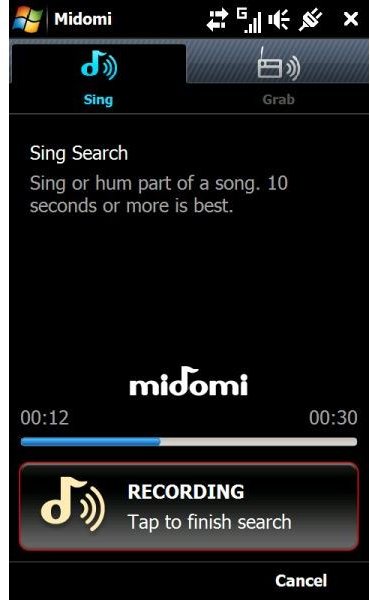
Midomi has a really impressive user interface that is clear, simple and very modern. Running the application takes you directly to the “tune discovery” screen. Here there are two options – hum or sing the song, or record it directly from a loudspeaker.
Testing the application, I found that singing the song required was useless – not on one occasion did Midomi find the right tune. This isn’t entirely surprising, as obviously voice recognition software is employed and as we all know, this remains less than an exact science. Humming a tune however gives a much better result.
Picking up a played back tune – which you might do to find the title – is also less than perfect. This may be due to the shorter time available for the sample. When humming or singing, Midomi takes up to 30 seconds of data; when picking up audio from a sound or TV device, Midomi takes just 10 seconds. As such there is plenty of opportunity for duplicate or incorrect results, not least due to the common trend in popular music for sampling other tunes.
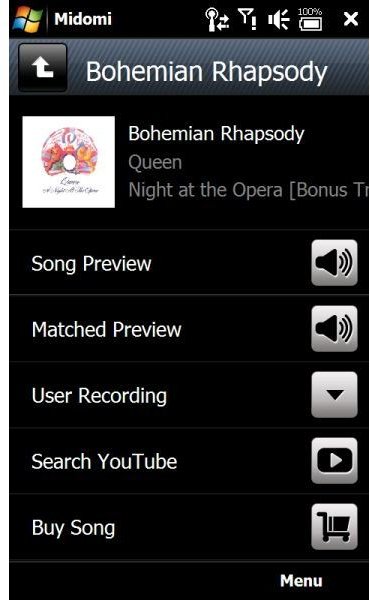
Once a tune has been recognised successfully, you’re then given the chance to preview the tune – good for checking it is the right one if you’re unfamiliar with the title – view the video on YouTube or even purchase it on Amazon.
A Great Multimedia Extension (4 out of 5)
Midomi is a great app, one that brings a great multimedia extension to your Windows Mobile device wrapped in a superbly finger friendly user interface.
Although the song recognition aspect of the application isn’t perfect it nevertheless holds up and with a small amount of persistence it is possible to get a result from the majority of popular recorded music in Midomi’s catalogue of tracks.
Note that a good data plan and very probably deep pockets are required for regular use of Midomi.


