There’s guitar tuners, Guitar Hero and virtual pianos for the platform, and now, unbelievably, you can even sequence music on your Windows Mobile phone!
What’s A Sequencer?
Commonly used in professional and home recording studios, sequencers are electronic devices - usually found as virtual devices on a PC - that allow you to order and edit samples of music, rhythms, beats etc.
They’ve been available as major components of PC based studios for the last 15 years - and now the technology has go to the stage where a sequencer can sit comfortably on a Windows Mobile device.
Klaar Syntrax might sound like a character from a 1950s science fiction movie, but in actual fact it is a sequencer for Windows Mobile - possibly the only one available.
System Requirements
Klaar Syntrax is available for download from the developer’s webpage, www.finished.nl . Although free, an unlock code is required in order to track which version of Windows Mobile is being used - this doesn’t need to be done until after installation however.
Installation of the 1.7 MB file can only be done via an ActiveSync managed connection - the EXE file need your phone connected to your PC to complete installation. The good news however is that Klaar Syntrax will apparently run on all versions of Windows Mobile.
Syntrax Screenshots
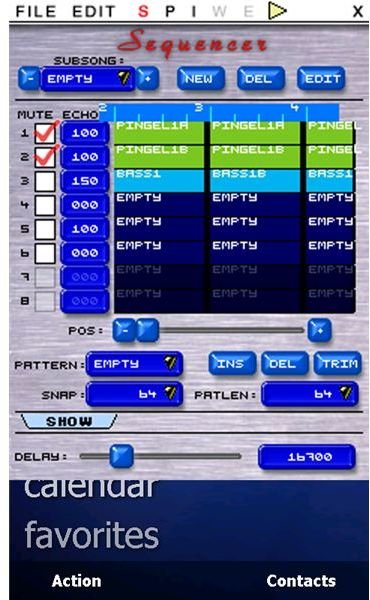
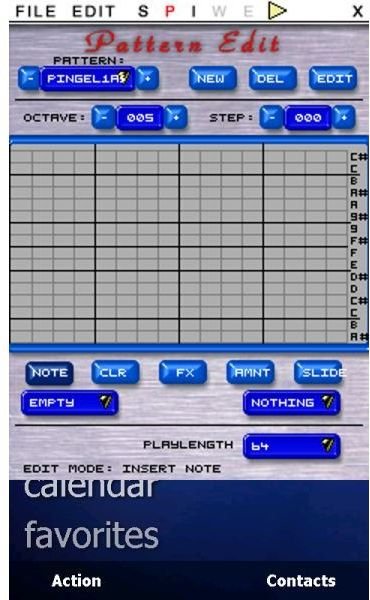
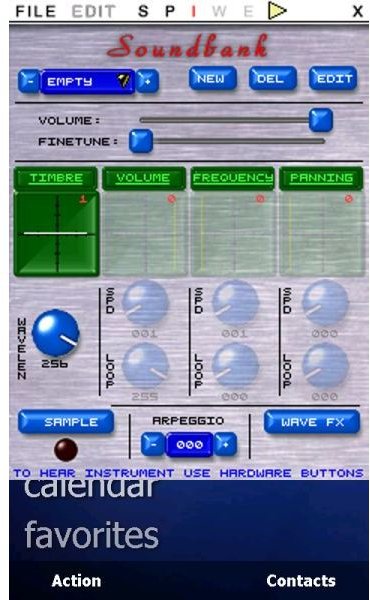
Sequencing A Track
Using Klaar Syntrax involves setting up a new track, creating a loop, choosing other instruments and then dropping the samples into position on the track.
It’s complex for the beginner, so thankfully there is a set of tutorials on the developer’s website which outlines the steps needed to get started with Klaar Syntrax.
Daunting at first, getting to grips with a sequencer can ultimately be very satisfying. Klaar Syntrax can be used both as a sole method of building tracks or as a way of testing ideas before getting back to your home studio and building the same track on your PC.
Endless Possibilities (3 out of 5)
Although not a massive fan of electronic music, I’ve spent quite a bit of time using Klaar Syntrax and found it fascinating fun. However I also found it quite tricky to use.
It could be that I didn’t pay enough notice to the very useful tutorials on the website, or because I prefer physical stringed instruments. For some reason though I just didn’t seem to be able to get Klaar Syntrax to build the sequence that I wanted.
However this is a fascinating piece of software. A mobile sequencer is a wonderful idea and the possibilities with this app are endless!


