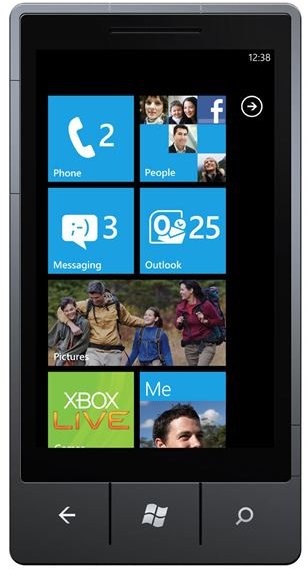
Windows Phone 7 is one of the most feature-rich mobile platforms yet - along with the 6 integrated hubs of always updated, “living” information is the powerful search functionality courtesy of the Bing engine.
What Are Windows Phone 7 Hubs?
Following the launch of Windows Phone 7 , several new details emerged about the exciting new mobile platform from Microsoft – most notably the use of hubs.
Hubs are the way in which information is organised on these devices – for instance there is a People hub in which all of your contacts are stored, an Office hub where you can deal with email and access documents, and a Games hub for accessing your Xbox LIVE network gamertag.
There is more to it than that, however. Windows Phone 7 also features remarkable search and internet capabilities intended to streamline and revolutionize how people use their mobiles.
The Power of Windows Phone 7 Hubs
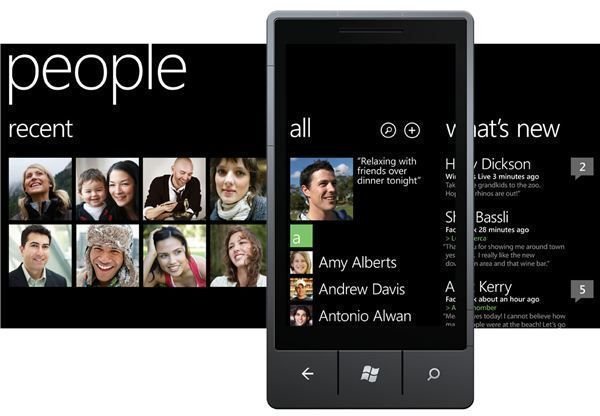
Using Hubs, Windows Phone organises all of your vital, regularly accessed information accordingly. For instance, if you use Facebook, you can see all of your friends in the People hub and notice what they have been doing as their status is updated. Similarly, in the Pictures hub you can access photos from Facebook posted both by yourself and friends, as well as manage your own photos.
This might seem like nothing new – until you consider that each of these hubs is available from the Windows Phone 7 home screen and that they actively update. They’re almost alive!
Hubs synchronise with Yahoo!, Windows Live and Facebook, and require you to sign-in to these accounts only once, when you first setup your handset.
Hubs for Everything
The full list of hubs is as follows:
People – includes a “recent” section for seeing those you have communicated with recently, an “all” section for seeing all contacts and “what’s new” to display the most recent updates.
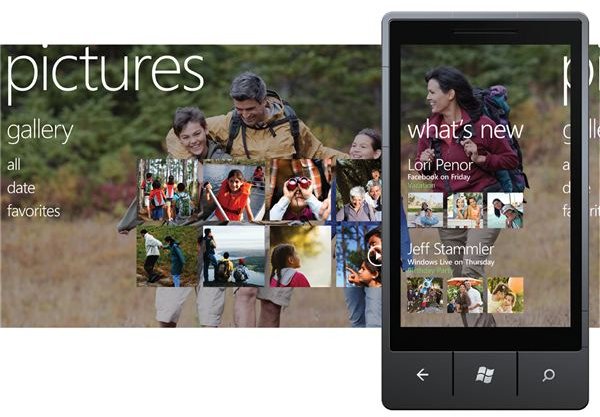
Pictures – photos on Windows Live and Facebook are synced to your phone, which also auto-chooses one of your favourite photos to use as a background. Taking and sharing a photo online can be achieved in 10-20 seconds.
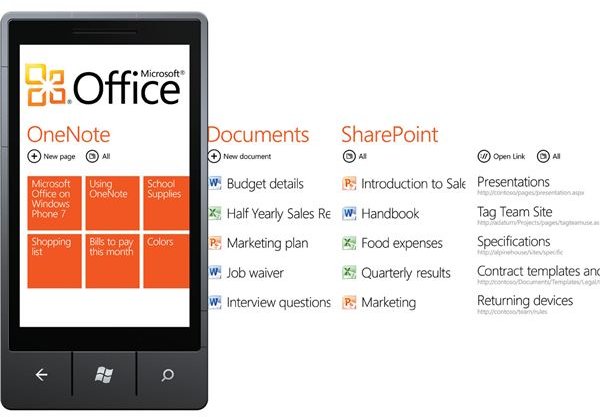
Office – access to email, OneNote for taking notes, Word, PowerPoint and Excel documents, and synchronising with the new version of Microsoft MyPhone.
Marketplace - Microsoft’s version of the iTunes App Store, the Marketplace provides access to free and premium third party apps and games for your WIndows Phone 7.
Music and Videos – these two hubs manage your media content using Zune. Along with managing tunes you already own, a monthly subscription can be paid to allow unlimited downloading of tunes with Zune Pass. Third party media playing apps such as YouTube can also be found in this hub.
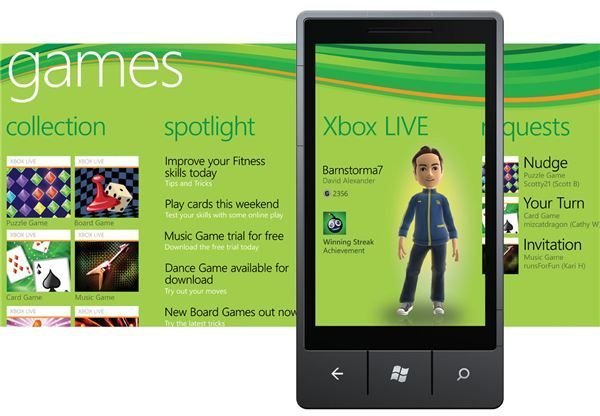
Xbox Live – the gaming hub allows you to manage your avatar, view your Gamerscore and accept multiplayer gaming invitations, as well as play games on your phone. EA are one of the Windows Phone 7 launch partners, and a version of The Sims will be available when the phones are released.
Search and Internet – The Key Windows Phone 7 Features?
Using Bing and Tell Me voice search, Windows Phone 7 can be used to perform some of the fastest searches. As you have seen above, integration with the Internet on Windows Phone 7 is a key element, and this is extended here to Search.
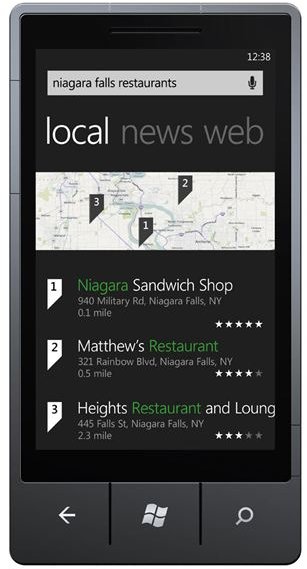
With a dedicated key, searching the Internet is given the same streamlined approach as snapping and uploading photos – Microsoft don’t want you fiddling around, they want you to get the right answer straight away.
Searching also detects where you are, using both Wi-Fi and GPS; for instance a search for local restaurants won’t require you to type your location. What it will do, however, is display a list of local eateries and their review ratings – and if you were in fact just searching the word “restaurant” you can slide the page to the right to view a standard list of search results.
Also integrated into Bing search is Bing Maps, which can also provide directions on your Windows Phone 7 to the restaurant you choose. All of these tools, as with the third party apps, are designed to be fully integrated into the user interface.
Windows Phone 7 Apps
Windows Phone 7 devices are high-spec and locked down, in order for Microsoft to manage exactly how the phones are used, from the included features to the third-party apps available from the Marketplace hub.
Figures for at-launch apps are unclear – figures seem to vary between 1000 and 2000 – but along with the 60+ games there are apps for IMdb, Amazon, Ebay ready to be used, while Facebook and Twitter are already integrated into the phone so don’t require acquiring separately.
One key app for US-based customers on the AT&T network is access to their Uverse Mobile, which will stream TV to Windows Phone 7 devices nationwide for a monthly fee.
The majority of apps that you would expect to see on a mobile device will be available for Windows Phone 7, although at present there is no definitive list. These will all be accessed via the Windows Marketplace and downloaded and installed via Wi-Fi and 3G only; unlike Windows Mobile, manual installation via PC will not be possible.
(Images from microsoft.com)


