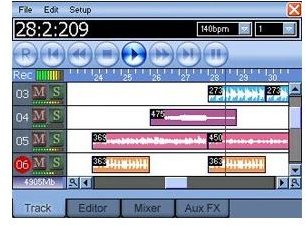
Using Meteor, you can edit multi-track audio while you’re in a coach, bus, or plane thanks to a clear and effective 12-channel virtual sequencer on your Windows Mobile phone!
Portable Recording Studio!
I’ve been playing guitar for 23 years, during which time I’ve been in a couple of bands and recorded a few demo tapes.
The first demo I did was on an open reel 8 track tape recorder, great for basic recording setups. A few years later saw a progression to portable devices with a 10 MB hard drive built into it before a friend showed me the superb results that can be achieved with a home studio PC.
Little did I know last year when I bought my current Windows Mobile device that twelve months later I would be able to use it to record 12 separate audio tracks!
It’s all possible thanks to a great Windows Mobile app. To try Meteor, a multi-track audio editor for Windows Mobile, download from www.4pockets.com . Following installation, you’ll be able to start playing around with some of its features.
Although a premium product ($29.95, £19.95), a demo version of Meteor is available. This app is incredibly useful for recording tracks and playing around with mixes while on the road. Capable of recording new tracks or tweaking existing MP3 files, Meteor features an interface similar to older versions of Cubase.
Recording a Track with Meteor
Using Meteor to record a track is fiendishly easy – simply select the channel to record on (01 is always best for the first track!) and click the R button to record.
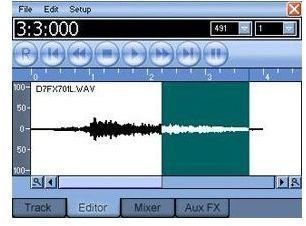
After the initial Audio Setup and Speed Test (which can both be redone via the Setup menu), Meteor is ready to record – a small meter in the top left of the screen will pickup sounds from your phone mic.
If you’ve ever heard radio phone ins that require the contestants to sing down the phone, or even been on the receiving end of a telephone serenade, you’ll know that phone mics aren’t anywhere close to being suitable. Don’t rule Meteor out, however.
A good quality Bluetooth microphone is a suitable alternative, while you might also be able (depending on your Windows Phone) to use a mini-USB adaptor to connect a standard USB mic to your phone.
Even if this doesn’t give you the intended result, it doesn’t mean you can’t use Meteor – it’s a perfectly good tool for on the fly recordings, and can also be used to mix pre-recorded tracks.
Mixing a Track with Meteor
Adjusting and mixing tracks can be done using the Editor and Mixer tabs – editing is a case of utilising the usual cut, copy and paste tool to adjust length or repeat a loop, while fade, normalize, reverse and other processing options are also available.

Effects can be applied such as delay, chorus, reverb, graphic EQ and many others on a track by track basis, while the File menu allows you to Export MP3 or WAV versions of the project you’re working on.
Mixing a track is best done using a headset – playback the required channel and go to the Mixer tab to make your adjustments to the level and balance. It’s that simple.
While there is no synth on Meteor – making it more of a portable sequencer than a portable studio – it remains a great audio editor solution.
Meteor: multi-track audio editor for Windows Mobile – download the demo from www.4pockets.com .


