Keeping tabs on what applications are using how much of your Windows Mobile device battery can be tricky – but these handy tools can make it a lot easier.
Why Use Battery Monitors?
Games, MP3 players, Twitter, Facebook, RSS feeds, Opera Mobile, email and of course phone calls – Windows Mobile has changed over the years form a mobile office solution to a full mobile communications suite, echoing the changes of the desktop computing world, and power is always needed. Internet connections are increasingly “always on” which leads to nightly battery recharges.
There are occasions of course when its difficult to see what application is draining power, or situations when a fully charged battery loses power in a matter of a couple of hours.
Luckily there are a selection of free tools available that assist in the management of the single most important element of any Windows Mobile device, the battery.
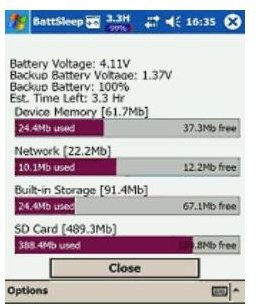
BattSleep
This application keeps a keen eye on your battery status in a similar way to a laptop power management application. A configurable utility, you can set BattSleep to alert you when to recharge or set it to put your Windows Mobile device into standby or shut down when the preset low battery threshold is reached.
Mimicking the Windows laptop power management is a great idea and one that I’m surprised Microsoft have so far failed to implement in Windows Mobile.
BattSleep is available free from FreewarePocketPC.net and runs on Windows Mobile 2002 devices up to modern Windows Mobile 6.1 handsets.
Batti
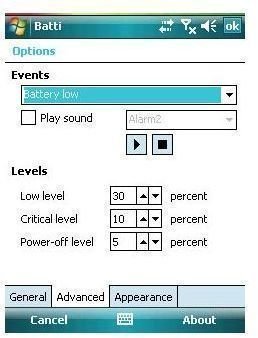
Again a battery monitor, Batty differs in that it is a configurable low battery alert that can display different colours and different audible indicators as per your specifications, based on low, critical and power-off battery levels that can be left as per the preset defaults or altered to meet the users preferences.
This obviously is a needed enhancement to the standard Windows Mobile battery management tool, giving you a lot of flexibility in the use and recharging of your mobile device.
Download Batti from FreewarePocketPC.net if you’re using a Windows Mobile 6 or later device.
Mobadi
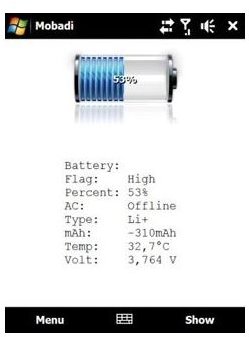
If you’re keen on the overall management of your Windows Mobile device phone battery, and have a HTC device (HTC Touch series phones for such as the Diamond and HD for instance) then Mobadi will allow both close monitoring of current battery usage as well as allowing the user to discharge the battery manually, a regular process that should ideally be carried out on a monthly basis in order to enhance the lifespan and performance of the power cell.
Available free from FreewarePocketPC.net , a version that will run with non-HTC devices is in development.
acbPowerMeter
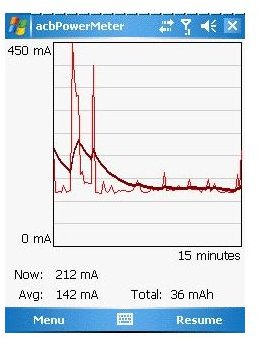
This tool provides real-time monitoring of current battery usage, meaning that you can effectively keep tabs on how much battery life is used by performing specific tasks. Simply run acbPowerMeter before connecting your WiFi, sending an email or making a phonecall, and monitor CPU usage and its effect on battery life – thanks to a lightweight installation, acbPowerMeter can be used to benchmark test your Windows Mobile device battery, and should run on any version from WM 2005 and later.
Available from www.acbpocketsoft.com this application is free.
Conclusion
This is a great selection of Windows Mobile battery monitoring application that no green-minded mobile user should be without.
By taking care of the battery power we use in carry out tasks on our mobile devices, we can cut down on inefficiency and save money on electricity bills, not to mention increase the lifespan of battery cells and minimise the heat deterioration of our Windows Mobile devices.


