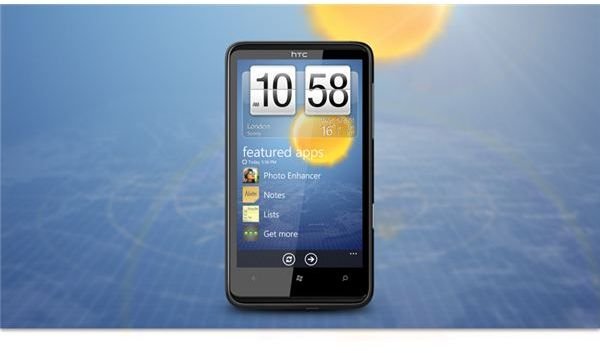
The HTC Hub for Windows Phone 7 is only available on devices made by HTC - it offers a selection of additional apps, such as a weather app and a YouTube viewer, and best of all it is free!
What is the HTC Hub?
Alongside all of the different apps that are available for Windows Phone 7 are those provided by the device manufacturers; a particularly good example of this is HTC’s YouTube app which offers a much better user interface and streaming than the other apps available on the Windows Phone Marketplace. However, as it is available only to HTC users, many Windows Phone owners won’t get the chance to benefit.
This app isn’t alone – thanks to HTC there are several apps available exclusively for their devices, alongside the HTC Hub, an additional hub option that delivers live weather updates and more to Windows Phone 7.
Accessing the HTC Hub
Owners of HTC Windows Phones will find the HTC Hub setup as one of the tiles on their Start screen on first use; it can also be found by swiping to the left to display the Programs screen (or by tapping the arrow).
When you open the HTC Hub you will see a nice animated introduction before a Sense UI-style user interface is displayed, with various options available. Although no e-mail alerts, social networking live tiles or access to the Pictures Hub are offered, the HTC Hub does present a nice alternative.
To begin, you will notice the clock is displayed, with your location and the current weather. Tapping this will take you to a full summary of the current weather as well as information on what will occur over the next few days. You should also notice that by sliding your finger down the right-side of the display you can cycle through various international locations such as Paris, Seattle and London.
Options for the weather can be accessed by dragging the three ellipses […] and choosing Settings – here you can assign a location and specify the regularity with which the weather app should be updated. Meanwhile with Edit locations you can remove and rearrange the order in which the international times are displayed.
Also Available in the HTC Hub…
The Windows Phone HTC Hub is more than just a weather app, however. Accessible here are any HTC apps that you might have installed (although these can also be accessed from your main phone screens) as well as access to any games that you have installed.
By providing this set of apps and games, the HTC Hub can be used as an alternative to the standard Windows Phone 7 screens, useful if you’re not keen on the Metro UI and have recently switched from an HTC Android device.
To access the apps and games, tap Get more; from here you can view the list of available HTC applications as well as launch anything that is available from the HTC Hub.
For instance you might want to run the HTC Photo Enhancer app – despite being run from within the HTC Hub this app will still be able to access any images you have saved to the phone. Meanwhile any software listed under the Applications tab can be installed, so look out for new apps; Games are listed on their own tab, but note that these are no different to the ones you would find in the main Windows Phone Marketplace.
To some, the HTC Hub is little more than an alternative Marketplace , but as you will have seen it can also be used as an alternative to the main Windows Phone interface if you like your options limited.
References
Sources: author’s own experience
Images: HTC Press Office, https://www.htc.com/uk/press _product_info.aspx?p_id=328


