I know only too well the frustration of not being able to have your Symbian apps install on mobile phones due to signing issues. Here I will show you how to sign Symbian applications and so avoid this problem.
Understanding Signing
Before you learn how to sign Symbian apps it is important to know what app signing is. Also known as code signing, this is the process of adding a digital signature to a piece of code in the application.
Code signing has various purposes such as resolving and preventing namespace conflicts, but most importantly security. Security is provided by using the digital signature to authenticate the author of the application, the build and version information, a checksum to ensure that the application has not been tampered with, as well as other forms of meta information.
Symbian signing ensures the security of your mobile phone by ensuring your application is authentic as is claimed. By default Symbian phones have restrictions against installing unsigned applications.
Which Type of Apps Require Signing?
Not all Symbian apps need to be signed. So very quickly I will make mention of what needs to be signed and what does not have to be signed.
The general rule of thumb is that any app that is distributed as an SIS or SISX format must be signed. These include Symbian C++ and Qt based apps. Others that should be signed, depending on the services they access on the phone, are the Java based apps.
Flash lite based apps do not need to be signed as individuals. If they are distributed with an installer then the installer, which is an SIS file, must be signed.
Finally, Nokia WRT based applications do not need to be signed.
What About Symbian Qt Based Apps?
Once you have developed and packaged a Symbian app based on Qt you will notice that the SDK tools do this automatically. In this case you would think that your app has been signed effectively.
This is, however, far from the truth as most mobile devices will not trust this type of signing. Signing does not mean your app is “safe” right from the onset. These apps will still have to undergo further signing from a trusted service such as that provided by Symbian Signed.
Express Signed
Express Signed is where you have your Symbian app signed without the requirement of a signed certificate. Apps signed using this method have some restrictions as to the services they can access on the phone. If your app uses AllFiles, DRM or TCB then you should not sign using Express Signed.
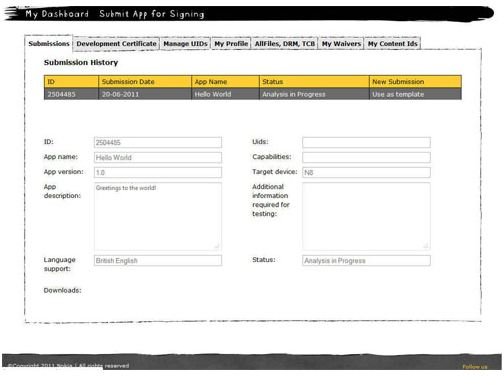
To Express sign you need to have registered for an account on SymbianSigned.com. Once you have your account registered and it is verified then you can go to the Submit App for Signing tab to begin the process.
You will get a form. You can fill in the details and submit the form along with your app for analysis which should take a few minutes. Once done, the interface will allow you to click a link that reads Complete Signing.
At this stage choose Express Signed and click on Next Step.
On completion you will get a final page with a link to download your signed Symbian app.
This signing may set you back in excess of US $100. There is another way, though, for those who want to have their apps published on Ovi Store.
Signing with Nokia for Free
Nokia provides free Symbian app signing as long as you follow these instructions.
Register for an Ovi Publisher Account on publish.ovi.com and provide up to five phone IMEI’s (International Mobile Equipment Identities). You will receive 5 UID’s based on these IMEI’s from Ovi Publish Support. You will then use one of the UID’s to package the unsigned SIS app using the Symbian SDK tools.
When you are done you can now submit the app using the Ovi Publish tool. There is a waiting time of about two weeks for the Quality Assurance team to verify your app.
Certified Signed
The process of getting your app Certified Signed is the same as the Express Signed process up to the point you select Complete Signing. In the next step you will select Certified Signed and click on Next Step.
With this method you have to agree to the Sogeti legal agreement and wait to receive an email with the quotation. This costs about US $325. You need to reply to approve. Once the fee is paid you will be required to send proof via a scanned copy of your transaction to facilitate the testing and signing of your app.
Make sure your app is in order because every test incurs the cost mentioned above.
Once done you will receive an email with a link to download your Certified Signed app.
References
- Symbian Signed, www.symbiansigned.com
- Nokia Developer Wiki, www.developer.nokia.com/Community/Wiki/User_guide:_Symbian_Signed#1._Overview
- Screenshot provided by writer.


