If you tend to receive a lot of attachments with your e-mail when you’re in the field or on the go and you need to view those documents for important information you can always use the factory installed document viewer application that comes standard on your Palm Pre. Here is a quick look at this ap
Overall Use (5 out of 5)
If you’re main goal with the Palm Pre is to have a mobile office when your in the field you can’t ignore the factory included Document Viewer that comes built into your Smartphone. This option not only offers a very sleek, optimized for viewing interface, it supports most of the major files you’ll receive in your email attachments.
Using the application is simple, just launch the Doc Viewer and all of your available (supported) file types will be shown. These file types include PDF Files, .PPT (Powerpoint), .DOC (Word), .XLS (Excel) and standard text (.RFT and .TXT). One click on the file of your choice then launches the viewer. Here’s a look at the viewer document choices screen and the actual view you’ll see.
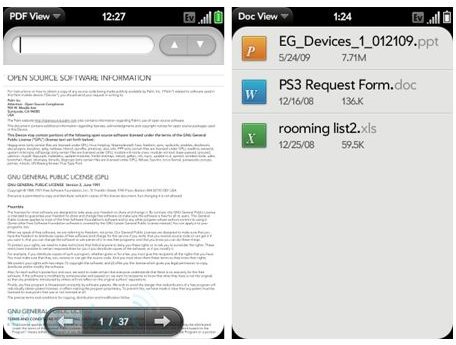
One of the great parts about this application is that it not only opens the documents you want to view, it keeps their original formatting in tact, while at the same time scaled in size so the entire document can be viewed one page after another directly on your screen, it even comes with full zoom in and zoom out functions that are extremely simple to implement.
Finally, considering the smaller font sizes you’ll find on your time Palm Pre display the text search option is also a great option. You can search any of your file types using the search bar at the top of the viewer and after typing in your text you can click the up and down arrows to navigate between each instance of the word within your documents. This option worked just as well as any other word finding option found on MS Word, Wordpad and other text based editors. It’s rather straight forward but very useful.
Document size also didn’t seem to give me many issues. While most Word documents, even larger files will be under 1MB some of my 5 and 6 megabyte files opened in a matter of seconds and I was easily able to navigate through there menus. I will admit however that the larger 10mb+ files did load slower and there was some random pausing issues.
Conclusion
The Palm Pre Document Viewer isn’t going to help you edit your documents, but it’s a great option if you simply need to pull up PDF files, MS Office files and standard text files when your on the move. It comes standard on your Pre which means its free to use, however I would have been willing to pay for this feature thanks to its usefulness.
Definitely play around with the Doc View, you won’t be disappointed.


