If you’re tired of visiting the same places in your area and want to try out something new, let your iPhone help you do so. With the Thrillist iPhone app, you’re off to a great adventure the next time you go out. Read our review of the Thrillist iPhone app to find out what Thrillist can do for you.
Thrillist iPhone App - What is it? What does it do?
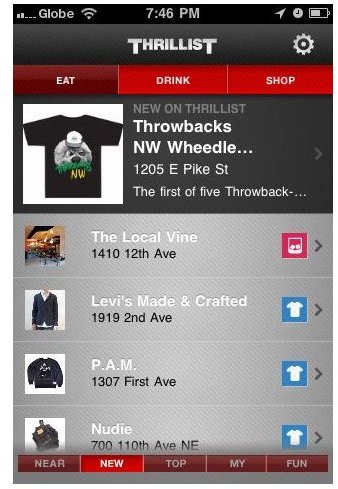
The Thrillist iPhone app is a mobile city guide covering various stores and establishments in 14 cities across the US and the UK. Powered by high quality, professionally curated recommendations, this iPhone app will answer your eating, shopping, and drinking needs. While there may be other apps of this kind in the App Store, Thrillist is different for the simple reason that it suggest places you never knew existed in your location. The app locates and suggests extra-ordinary places - places that are quite unique and different.
To make this possible, all the places that are featured by the Thrillist iPhone app pass through strict editorial controls. The app’s human editors also make a point of only including the most glorious photos and videos as part of the places’ information and details. This is to ensure that you will be enticed to visit a particular place. In addition, the list of suggested places is updated regularly and new places are added every weekday.
As an iPhone app, Thrillist is full featured too. It utilizes the location features of your iPhone to identify, via GPS, places nearest to your location. It also lets you select specific neighborhoods that you would like to explore. The app also gives you the latest write-ups of brand-new or undiscovered local joints as well as the very best options recommended by the other Thrillist app users. You can also create your own Thrillist account. This will enable you to add places you chanced upon as you use the app and save them to your list of places to visit, or perhaps favorite places if you have visited already. Additional fun is brought in via several enjoyable games that you can play as well.
Of course, to be on a par with other iPhone apps, Thrillist for iPhone also has a sharing feature via email, Twitter , Facebook and even Foursquare check-in. Finally, you can also filter the app’s suggestion by places to eat, drink, and shop. Or if those filters are not enough individually, the app lets you combine them to display more suggestions.
Our Verdict
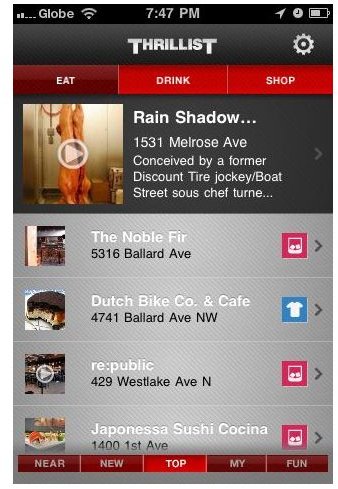
Suffice to say, the Thrillist iPhone app is definitely a pretty good location-based mobile app. The fact that it tries a different approach from what similar iPhone apps are doing means this app claims a place in our book of best iPhone apps. Is it for you? If you love Foursquare or other iPhone apps that let you check-in to places you’ve visited, the Thrillist iPhone app will possibly help you check in to more “uncharted” places.
Thrillist is a pretty good option with a sleek interface that will not bore you out of your wits while you are using it. The different content that the app provides - photos, videos, and important information, make it a very informative iPhone app. Even better is the fact that this app is available as a free download from the App Store. So, all it will cost you to at least try this out once is some space from your iPhone’s storage.
Want to download this app? Here’s the App Store download link .
Image credit
Screenshots courtesy of author (iTunes Download )


