This application puts all of the popular messenger services into one program with ease. Stay logged into multiple IM accounts at the same time to message all of your friends for free
Connecting to Multiple Instant Message Services
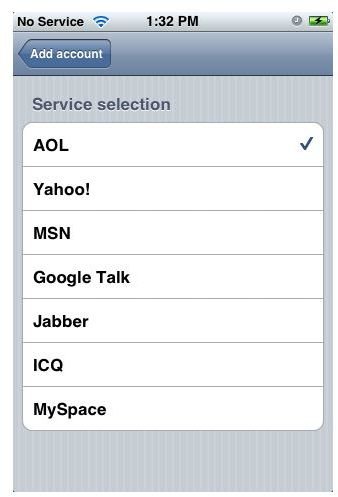
There aren’t too many instant messenger applications for the iPhone. The most popular one though is probably the AIM application that allows users with an AOL instant messenger screen name, the ability to chat freely with their friends on their iPhone. There are many individuals out there however that use other services like Yahoo, MSN and Jabber. IM+ All-in-One touches on all of these. It also supports a few others including MySpace, Google Talk and ICQ for those with accounts with those services.
How the IM+ All-in-One App Works
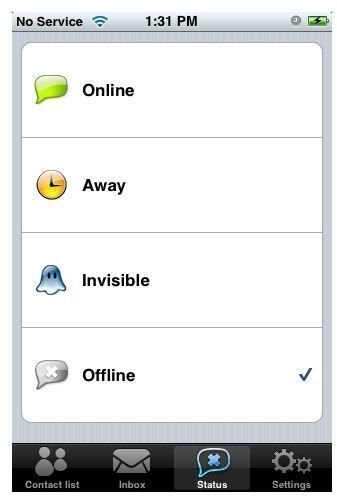
The sign on process is very simple. You setup whatever account you prefer and fill in your screen name and password. This is a one time thing as it saves in your iPhone. You then click status and you can choose online, away, invisible, or offline. There are four tabs at the bottom to choose from as well, contact list, inbox, status and settings.
What’s nice about IM+ All-in-One is the fact that you can be logged into all of these services at the same time. The contact list is simple and very easy to read. You can simply click the name and message them. The messages can be deleted the same way an email is deleted, with the finger swipe.
The only issue I have with this application is one that is similar with some other messenger applications. When you close out of it to go back to your iPhone menu, it signs off. Therefore you have to sign in and out if you want to browse other options on your iPhone.
Messaging Features
Receiving a message is set up well as each person is given their own little envelope showing their name. When you have an unread message then the envelope is closed and opens once you read the message. You also have the red notification at the bottom in the inbox tabs which is another feature that is similar to the email system on the iPhone. You are only able to message your friends though, there’s no file sending of any sort so you get strictly an instant messaging service.
This application serves its purpose for sure and though it’s nothing ground breaking, it does allow use of multiple messaging accounts at the same time which doesn’t hurt. IM+ All-in-One is all a completely free program. That means when you message somebody, it is not charged as a text message. So you can message your friends all you want and not worry about wasting text messages. This application reigns over the AIM application because I think it’s a little more simpler and easy to use and the allows multiple accounts.
IM+ All-in-One can be downloaded from the iTunes application store on your phone or on your computer and can be found in the social networking category in the store. Again, it is a completely free application to download and use.
Screen Shots