Waze, an innovative iPhone traffic app, works to help you navigate and estimate your commute times while receiving traffic updates and accident reports from other Waze users in your area. Find out if this app is helpful or a waste of your time.
What is Waze for iPhone?
One day, while particularly annoyed with the traffic I was stuck in, I used my Twitter app to complain about why it was called “rush hour” when we were barely moving; I renamed it “sloth hour”. To my surprise, I received a response from Waze’s Twitter account with a link to download the free traffic app for iPhone; the tweet simply said, “This might help you not get stuck in bumper to bumper traffic.” Amused that they had no idea that I review iPhone apps and intrigued by the idea of real-time traffic updates, I decided to check it out.
I was a little confused by the app at first, but quickly caught on to the premise. Think of Waze as a Google Maps/Facebook/Foursquare hybrid. The primary function of this traffic app for iPhone is to give you turn-by-turn GPS navigation while calculating your approximate drive time to your destination. The app depends on social networking of its users to update road conditions, report accidents and even notify the developers of inaccuracies of the map. You even gain “points” for your Scoreboard for completing specific functions within the app, earning yourself a higher ranking level among users.
Download Waze for Free
Image Credit: Screenshot provided by author
Functionality (3 out of 5)
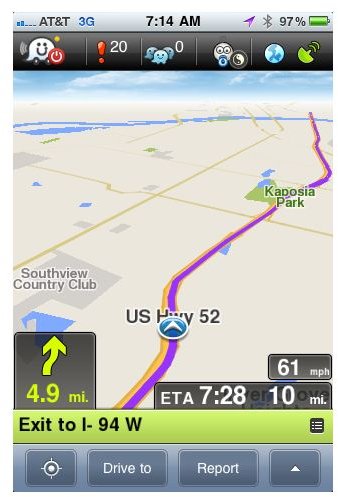
This social network platform is still in its development stages, but they aren’t shy about admitting it. Waze encourages users to bear with it while they depend upon use of “Wazers” to improve map accuracy and traffic updates. As Waze recruits more users in your area, the features of the app will improve because more travelers will be reporting traffic slowdowns, police traps and accidents as they pass them.
Using GPS for iPhone , the app pinpoints your location and asks you where you are driving to. Once an address or destination is entered, the app will tell you how to get to your destination as you go. The app is great to use during your commute to work, not necessarily for the turn-by-turn directions, but because it continually updates your estimated time of arrival at your destination based upon your driving speed and known traffic conditions. There were a few kinks in the directions I was given when leaving my house, but I also know that my street was built within the last ten years and probably wasn’t on the map. After my first few trips the app “learned” the proper directions to give.
Overall, the functionality of the app is decent but needs improvement. I also understand that more users will improve the accuracy, so I can ignore the few slight drawbacks in functionality while the app builds its user base. I also like that the developers encourage users to report issues so that they can continually improve.
Image Credit: Screenshot provided by author
Features (5 out of 5)
I was stunned by the amount of features that Waze packed into this free app. It speaks to their commitment to make Waze the next big thing for social networking.
The Maps
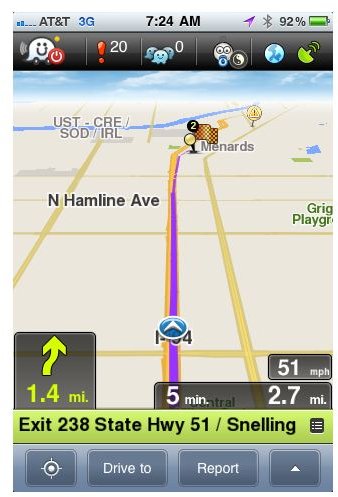
The map on Waze is fun and easy to read. You can choose from a 2-D or 3-D map view. The slightly 3-D view was my favorite. It zooms in just enough for you to easily see the streets and highways in your area, but not too far so that you can’t see where you’re going.
The GPS Navigation
Although improvements need to be made to some areas of the mapping, the voice guided turn-by-turn directions are helpful. In my experience they were usually accurate. Only in less well known areas was I instructed to turn a wrong direction.
Reporting Traffic Events
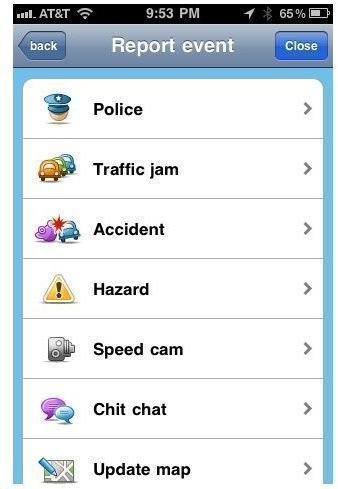
This comprehensive iPhone traffic app allows you to report traffic events as you see them to help other Waze drivers avoid slow traffic. You can report police on the road, traffic jams, accidents and road hazards (such as construction or debris).
Social Networking
The app allows you to create groups and interact with commuters in your area. This helps to alert other Waze users of traffic conditions on their routes.
Image Credit: Screenshots provided by author
Overall Waze iPhone App Rating (4 out of 5)
Overall, the functionality is average, but the features are excellent. I became an instant fan of the Waze app and enjoy having my commute time estimated as I go. Although development is in progress, it just means that the traffic app that I already enjoy will only get better with time.
The graphics are enjoyable and the turn-by-turn GPS navigation is impressive, especially for a free traffic app for iPhone. Waze also manages to create a sense of camaraderie among drivers using the app, which is refreshing in times where road rage is commonplace. I’d recommend Waze to anybody looking for a good GPS iPhone app .
Resources
Waze, www.waze.com


