
Keen to enjoy FaceTime without having to buy an iPhone 4? Find out how use FaceTime on an iPhone 3GS here.
Introduction to FaceTime on the iPhone 3GS
On this year’s iPhone refresh with the iPhone 4, one of the headline features is video chat through FaceTime calling. FaceTime has since been brought to the fourth generation of iPod Touches and all Macs with iSight webcams. This is one of the reasons so many wanted to upgrade. It was only a matter of time until FaceTime was brought to the 3GS and iOS 4.1.
Now with a jailbroken iPhone 3GS, you too can rejoice and enjoy the FaceTime fun with video calling with all your friends. Since there is only 1 camera on the 3GS, the other person won’t be able to see you or you won’t be able to see them at the same time (without a mirror), it’s a pretty fair compromise making the most of your year-old phone and enabling an extra feature for free!
It’s also great for enabling FaceTime calling for free voice calls over the internet without using minutes (Wi-Fi or 3G) or sharing what you’re seeing with a friend live without emailing them a picture or MMS.
What You’ll Need to Enable FaceTime on an iPhone 3GS
- A Jailbroken iPhone 3GS with at least iOS 4.1.
- Cydia app.
- The FaceIt-3GS app through iPhoneIslam’s Cydia Repository.
Installing FaceIt FaceTime for iPhone 3GS
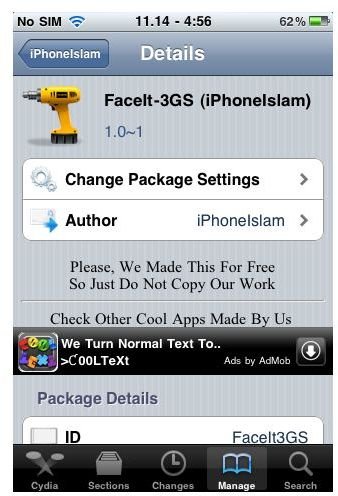
Open Cydia and run the following commands to install FaceIt-3GS on your 3GS.
1. Tap Manage > Sources > Edit > Add.
2. Add https://apps.iphoneislam.com as a repository.
3. Return to Cydia.
4. Tap Done.
5. Choose iPhoneIslam from your Sources.
6. Select FaceIt-3GS (iPhoneIslam).
7. Install.
8. Reboot Device when prompted.
Once it has been installed and your device has been rebooted. Check that FaceTime is enabled on your iPhone 3GS.
Tap Settings > Phone, the FaceTime toggle switch should be set to On. If you get a message about activating, this is normal and can take as long as several hours. Be sure your phone is connected to the internet (preferably over Wi-Fi) to get Facetime activated as soon as possible.
Using FaceTime on an iPhone 3GS
To use FaceTime on an iPhone 3GS, start a call with another iPhone (like an iPhone 4 ), and select FaceTime while in call or select a contact from your address book who has FaceTime through an Apple iTunes account. Once in a call, it should connect and should display what the other camera is showing!
In use, this method works well and comes as a welcome surprise to iPhone 3GS owners everywhere! The quality seems decent and it could definitely come in handy!
Unfortunately, this will probably never work with a jailbroken iPhone 3G or 2G since they don’t quite have enough processing power and RAM and their cameras don’t natively support video recording anyway. But, who knows what they will come up with next!


