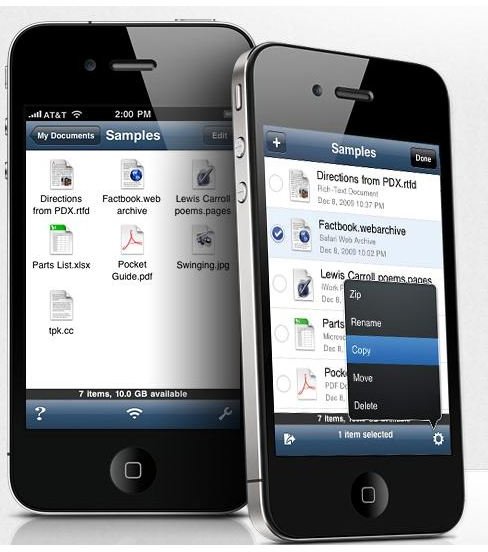
Ever wanted to have a portable hard drive in your pocket? Well now you can with this great app. You can use your iPhone as an external hard drive and more, while still keeping it as an iPhone.
Ultra Portable Data in the Modern World
Nowadays it’s simply not acceptable to rely on CDs and even USB thumb drives to some extent. We’re increasingly being required to have the capacity to carry around large quantities of data in our pockets for school, college work and personal use. And not just simple Word documents either.
Numerous times I’ve found myself needing a portable solution to carry around entire programs of over 1GB or feature length movies. Your average CD just won’t cut it.
Well, most of us have a great make-shift external hard drive with us all the time. Your iPod or iPhone.
Few can actually fill the entire memory allowance on their iPhone so why not use what you have left over as a portable storage device?
No Formatting Required
With many devices, in order to effectively use them as an external hard drive you need to format them (erase their hard disk) and use them as just an external hard drive. While this is certainly possible with an iPhone you don’t need to. There are numerous apps out there which enable you to hook up to your computer and transfer large files to your iPhone easily while still being able to use it for its intended purpose day-to-day.
Air Sharing App
So what is this mystery app which I recommend as the best app for transferring Windows files from the PC to the iPhone? AirSharing by Avatron.
This app has numerous features that made me fall in love with it. Firstly, it does what it says on the tin and allows you to use your iPhone as a sleek external hard drive while still keeping it as an iPhone.
Also, you don’t need a computer to view your files as you would with a normal external hard drive. You can open the app and see what you have stored on there and view how much allotted memory you’ve taken up and how much you have left. Furthermore, images, text, PDFs, bookmarks and more can be readily opened up and viewed using AirSharing.
Printing is no hassle either. You can print directly from your iPhone without any special software. Handy, no?
Nice Little Extras
But AirSharing isn’t just a bog standard file storage application. There are a few extra features that made me want to buy this application.
With normal external hard drives they’re limited to their basic function - to store. AirSharing allows you to access you files and make basic changes which is a great help. You can delete files without hooking up to a computer, change file names and create sub-folders to organize your storage.
You can also compress your files by creating .zip folders to further increase the storage potential of your iPhone!
If you find yourself needing extra portable storage consider using your iPod or iPhone, and definitely give AirSharing a try. At just $5, it’s a worthwhile investment and it could well be the best app for transferring Windows files from the PC to the iPhone.


