Having trouble finding sound management apps for your iPhone? Well your search ends here. Here is a round up of the best sound management apps designed specifically for the iPhone as well as the iPod Touch and iPad. No more hassle and missed calls or appointments, these apps are here to help.
The iPhone is certainly a brilliant device, but like many other smartphones, it has its limitations. One of which is its lack of sound management features. The good thing is there are iPhone applications that were created just for the sole purpose of addressing this problem. This brings us to the best sound management apps for the iPhone. While these apps have a bunch of features in common they are unique through their functions and additional perks, like creating playlists or ringtones and so on. In all they are guaranteed to help you better manage and control the sound functions on your iPhone.
MyProfiles
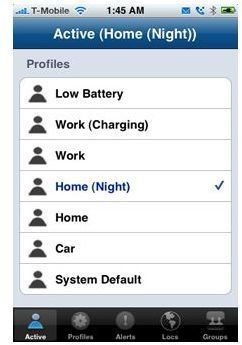
MyProfiles is a terrific app to effectively set alerts for various functions on your iPhone
. It takes the stress out of having to constantly change the alert settings on your phone each time you step in to a meeting, take a nap and so on. You can customize alerts for critical emails and SMS messages according to subject, who the sender is and the time they are sent. So you don’t have to keep checking your phone each time an email or text message is delivered.
MyProfiles gives you complete control not only by assigning alerts for different functions but it also works how, when and where you want. For instance if you want to take a nap, the app will silence the phone, but signals you only if someone of importance was to call. Additionally, you can adjust the vibrate patterns, escalate ringtones, create a blacklist or whitelist, plus much more. Simply eliminating the small hassles in your day can make a whole lot of difference. My Profiles is a great way to get started and put some order in your day-to-day schedule.
Auto Silent
Auto Silent is one of the most popular applications to manage the sound on your
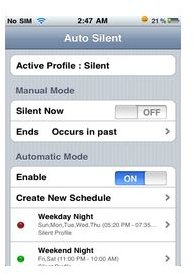
iPhone. It is an effective solution to automatically and manually enable alerts and assign preferential ones for a number of specific purposes.
With the manual mode you can disable sounds or vibrations and set a time to automatically restore their signals so that they are initiated at convenient times. For automatic mode the app will automatically put your phone in silent mode according to predefined schedules for meetings, appointments and other important occasions. Once the allotted time for those occasions has elapsed, the app will enable the alerts once again.
Auto Silent can also sync with your calendar entries so no matter if the silent mode is enabled, it will always alert you once the calendar event was configured to alarm. Additionally, you can create your own schedules and profiles and set the phone to alarm according to those settings, instead of alarming for each calendar event. Plus it has an independent silent switch that will work alternatively, especially if the phone’s built-in sound switch goes bad.
ToneFxs
ToneFxs is another great sound management app for iPhones as well the iPod Touch
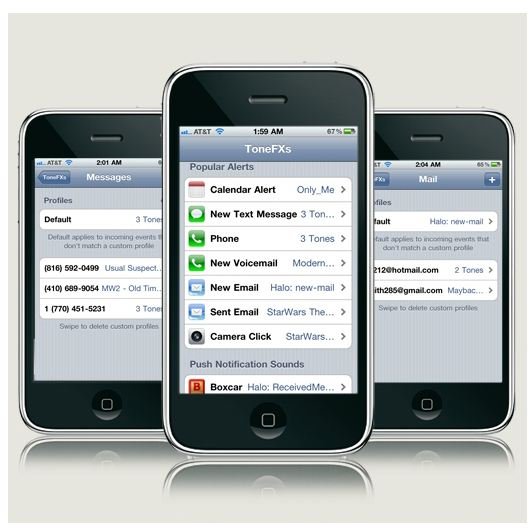
and iPad running on iOS 4. Users can properly customize sounds for emails, SMS messages, push notifications, calendar alerts, incoming calls, ringtones and other alerts. ToneFxs allows you to assign special alerts to specific contacts when they call, so you can differentiate between personal and business calls as well as calls you want to avoid.
In addition, you can also shuffle multiple tones for all the alerts, improve arrangement tones, manage tap sounds, silence tones and much more. You can use the iPhone’s existing ringtones and Winter Board Theme tones or you can create brand new tones with an integrated tune maker known as the ToneFXs Creator. It works independently of iTunes and is a simple download that also boasts a pretty nice interface, which allows for easy manipulation of all the app’s features and functions.
White Noise
A great addition to this list is White Noise. The interface has a high definition
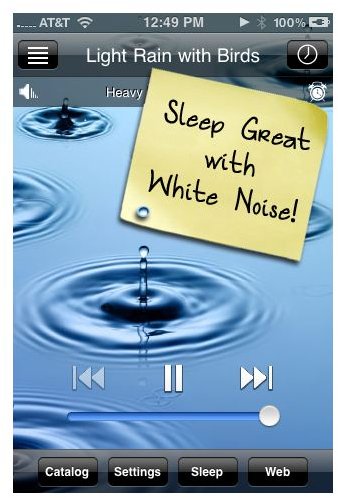
appeal and allows for easy and quick accessibility of all the functions. With this app you can select from a long list of sounds that can be assigned to different functions as well as adjust the volume, set shutoff timers and alarms, and even create playlists and mixes, plus play background audio.
Also, you can star your favorite sounds and organize your playlist using its intelligent sound catalog feature. Users gets precision customizable features that can adjust the balance and pitch controls, fade the audio to a stop as well the alarms, slow the crashing waves, lower the chimes, make the train faster, and speed up the fan, plus much more.
Ambiance
This app is known for its dynamic range of sounds and the customizable features
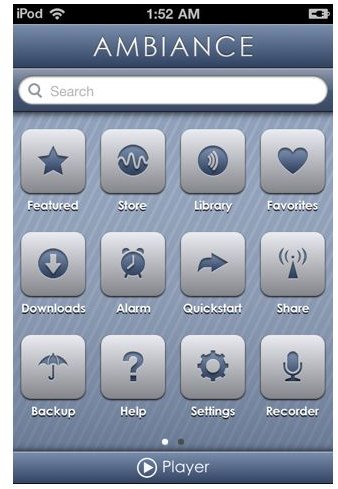
it offers to create personalized audio for your iPhone. However, it can also help you to control certain sounds for alarms, plus assign ringtones and other alerts. You can use the alarm mode to help fall asleep and wake up to any of its 1000 + free sounds.
Additionally, Ambiance allows you to play sounds in the background, record your own sounds , download and add sounds, create sound mixes, categorize sounds in groups, create playlists, share sounds wirelessly, backup and restore audio, create a favorites lists and much more. It is focused more on sound effects rather than controlling and managing the audio alerts for functions on the phone. It does cater, however, for a few sound related tasks and can be a lot of fun to use.
References
- My Profiles, https://www.intelliborn.com/myprofiles.html
- ToneFxs, https://www.efksoft.com/products/tonefxs20/
- Auto Silent, https://iphonepackers.info/install.html
- White Noise, https://itunes.apple.com/us/app/white-noise/id289894882?mt=8&ign-mpt=uo%3D6
- Ambience, https://itunes.apple.com/us/app/ambiance/id285538312?mt=8#
- Image Credit - Screenshots courtesy of the respective app developers.


