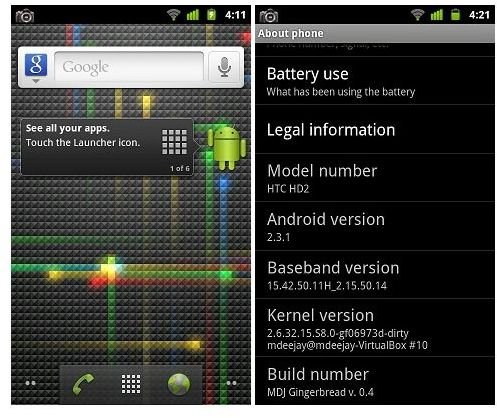
A guide which explains how you can run Android 2.3 Gingerbread, the latest version of the Android OS on the HTC HD2.
The HTC HD2 was launched a while back. It was a pretty decent smartphone and came with a superb 1 GHz processor and 448 MB RAM which was the best mobile hardware at the time, though it’s pretty standard now. It even had an impressive 5 MP camera. The only shortcoming of the phone was that it ran Windows Mobile 6.5 Professional which pretty much sucks compared to Android and iOS.
However, the HTC HD2 had surprisingly good developer support from modders at XDA and other forums. It is one of the most modded phones and runs a wide variety of OSes like Ubuntu, Android and Maemo.
When Android 2.3 Gingerbread was announced and the AOSP source was released to developers, the HTC HD2 was one of the first to get an unofficial port of Android 2.3.
Check out this preview of Android 2.3 Gingerbread to see all the new features it brings to the table - Android 2.3 Gingerbread Preview .
In this tutorial, I will show you how you can easily install Android 2.3 Gingerbread on your HTC HD2.
Here’s a list of the components and features that work and those that don’t.
Working components / features:
- 3G / Data
- Audio
- Bluetooth
- Wi-Fi
- 720p video playback
- Phone
- Camera
Components which don’t work properly
- Camcorder
- GPS
How to Install Android 2.3 on HTC HD2
1. Download the latest build of Android 2.3 Gingerbread for the HTC HD2. You can get it here - Android 2.3 for HTC HD2 version v1.0 RC4
Extract the files from the 7Z archive using WinRAR or 7 Zip.
2. Copy the Android folder to the root of your SD card. You can use either a card reader or the data cable to connect your SD card / HTC HD2 to your PC and transfer the files.
3. Copy the data.img files from the archive to the Android folder on your SD card.
4. On your HTC HD2, open the Windows Mobile File Manager and browse to the Android folder on the root of your SD card.
5. Open the CLRCAD executable and then open the HARET executable. It should take a few minutes after that.
6. Your HTC HD2 will now be running Android 2.3 Gingerbread.
Note: CLRCAD is a fix for sound on the HTC HD2. It will ensure that sound is enabled on your phone even after booting into the Android OS.
If you reboot your phone, you will be switched back to Windows Mobile. To boot back into Android, repeat steps 4 to 6.
If you don’t want to try Android 2.3 Gingerbread with your HTC HD2 now, as it doesn’t support some features and is still a bit buggy, you could try Android 2.2 Froyo. It works pretty well.
Also, try this at your own risk. This process has worked well for most users, but if your HTC HD2 gets bricked, we or XDA are not to blame.
ROM source: XDA
References
- Screenshots provided by writer.
- Android Advices: HTC HD2 - Steps to Install Android 2.3 Gingerbread OS, http://androidadvices.com/htc-hd2-steps-to-install-android-2-3-gingerbread-os
- XDA Developers: Gingerbread Ported to HTC HD2, http://www.xda-developers.com/android/gingerbread-ported-to-htc-hd2


