GolfCard is a handy golf card scoring application for Google Android based smartphones. The program features over 26,000 golf courses and a ton of functionality for serious golfers looking to track their single games and progress over time.
Whether you want to view fly overs of each hole at your favorite course or you want to keep track of your score and the score of the players you’re playing with, the GolfCard app offers something for everyone. I personally use the application to track my course scores and plot my progress. While I know several iPhone users who use the application to track just the scores for each course they play on a single basis with no need for progress reports. How you use the app is up to you, but it’s definitely worth a closer look.
Overall Use (5 out of 5)
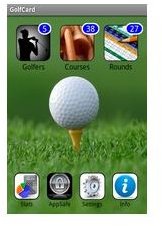
The first thing I noticed when launching the GolfCard app was the excellent graphics. Even on the main menu screen the background is vibrant with well chosen wallpaper. While the icons themselves are large enough that I wasn’t “fat fingering” the buttons. The main screen also makes it simple to choose where you want to navigate. The options at this time include: Golfers, Course and Rounds along the top side of the screen and Stats, AppSafe, Settings and Info along the bottom.
After setting up my name as a player I had to choose my course. Thankfully this application queries OobGolf which features over 26,000 golf courses from around the world. I actually found my local ISU golf course (owned by the college) and was able to see each hole. I could see those holes because the application offers extensive “fly over” shots of each course. This is a great option for determining exactly how far out the dog leg on the par 4 sits, allowing for shot strategies to be developed.
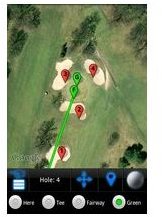
The green line then shows the hits to the fairway so you can get an idea of how far off your shot would be from specific points. Green circles also show up showing you the 50 yard distance to each point on the map, making it easy to determine your club selection at any point.
Since the program uses satellite images for your current location the program also ensures that the info you use is right on target with the spot you’re playing from. On my golf course the information pulls up in about 10-15 seconds, ensuring I can quickly check the holes fly over and other provided information without pissing off the players waiting to play behind me.
As I mentioned the application also serves up statistics, these stats include a variety of features including the player in question, their scores on courses and how they reached those scores. When using the application you’ll tell the application where each of your shots landed and how you approached the next shot. For example there’s a spot to put in bunker shots called “sand shots” while there is also a “putt” option, “chips” and “penalties” all of which are combined with your fairway shots and overall score to provide a glimpse into how your shot selections effect your game over time.
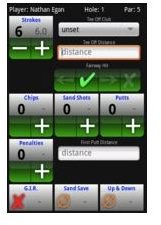
Your scoring can even show you how many birdies, pars, bogeys, etc. you score during the completion of 18 holes, while providing your best scores for a course from day, week, month and even yearly views.
If you feel like your improving your game this is a great app for determining if you are in fact getting better. It can also allow you to see what type of holes you play best on for example Par 4’s with a dog ear left or dog ear right, downhill holes on par 5’s, etc.
Finally you can also save your information and even share it with friends right from your device. I like the CSV file format as it allows me to ensure that my data is safe for future viewing on my PC if I choose to examine it in that manner. The on screen emailing is also helpful if you want to brag to your friends about new personal records you set on any given course, while showing them how you did it.
Conclusion
GolfCard is a very worthwhile Google Android application that provides excellent player tracking while offering thousands of courses to choose from. You can even request that your favorite course is added in the event that it’s missing from the OobGolf database.
I personally found the personal history tracking to be of the most use, especially when determining which clubs I needed to work with the most in order to improve my game.
GolfCard is a sleek, well put together application that I highly recommend you download from the Android Market. If you’re an avid golfer you definitely won’t be disappointed with this application.
References
Android Market, https://market.android.com/details?id=com.senygma.golfcard


