If you receive a lot of MMS messages you may need to save the attachments that come with those messages. Whether you need to save an audio, video or photo file this application can help you save time.
The Save MMS application is a simple “add-on” application for use with Google Android MMS. Using this program you can easily save your incoming attachments onto an SD card for quick access at a later time. The application is free and available via the Android Market. Keep reading to learn more about how this application works, then head into the Android Market and give it a download.
Overall Use (4 out of 5)
The Save MMS app is a very simple program to use: simply click on any of your MMS attachments that are displayed in the included MMS attachment gallery and then choose names to save them by. The gallery is simple to use: it offers a grid format that shows all of the files you have available and the names of those files.
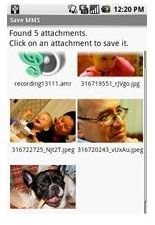
Once I found the file I wanted to save permanently on my phone I just needed to click on the photo in question. Clicking on the photo then launches a “save” screen where I could enter what I would like to call the file. Considering many MMS files such as those displayed in the screenshot above arrive with strange file names, I liked the option to change the file name. Especially since file names typically come with long sequences of numbers and letters that can be hard to discern.
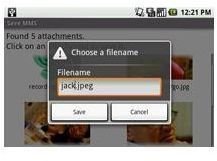
Once I hit the Save button, the program then saved the file to the SavedMMS directory on my SD card and could easily be accessed by my multimedia applications such as the integrated music player and photo viewers.
Conclusion
Overall, Save MMS is a simple application that integrates well with older Android OS’s such as “Cupcake” and “Donut” as well as with the newer “Froyo” and “Gingerbread.”
I like simple applications that offer a straight to the point purpose and Save MMS is no different. The interface is crisp and clean and the program is extremely intuitive because of that fact.
Overall, a great achievement for developer Andrew Schwimmer . Check out his other apps as well, they are all simple but well thought out.
References
-
Android Market: Save MMS, https://market.android.com/details?id=com.schwimmer.android.mmsextract&hl=en
Advertisement -
Shaswat Patel: 12 Free Cool Android Apps Which You Must Have in Your Phone, http://www.shaswatpatel.com/12-free-cool-android-apps-which-you-must-have-in-your-phone
-
Screenshots provided by writer.
Advertisement -
Android Wiki: Save MMS, http://en.androidwiki.com/wiki/Save_MMS


