If you are a Bank of America customer and you happen to be using a Google Android smartphone you’re in luck! The Bank Of America App for Android is a great piece of secure software that offers a ton of useful features. Keep reading for a first look and review.
Overall - First Look (4 out of 5)
From the very first time I opened the Bank Of America App I was impressed with the “Web 2.0” feel and super easy to use interface. Users from the first screen have two options to choose from: Mobile Banking and Locations. If you choose the Locations option a nice and easy to follow map will appear, here’s an example:
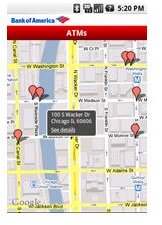
As you can witness from the picture above the map shows all of the available banking and ATM locations in your immediate area with street names labeled along with major roadways, this map makes it very easy to find a quick place to withdraw cash or a location to visit if you need to speak directly to a banking representative. The BofA Map uses location based services which means you don’t have to have a GPS signal, however with GPS enabled my maps pulled up within 10 seconds and I could easily plot my route to the nearest location.
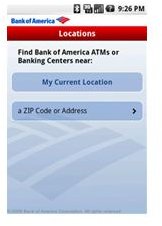
You can also find locations by entering your locations name or zipcode:
While simply finding locations such as ATM’s and Bank Branches is a great ability I found the actual mobile banking to be the best part of this app. For instance its very easy from your device to transfer funds between all of your BofA accounts along with the ability to setup online bill pay just as you can from your BofA online account while also checking the available balances of your accounts in real time.
Overall the banking abilities run very fast on the T-Mobile G1, however I was using a test version with a test BofA account so I can’t attest to the actual bill pay feature, although I assume as it was easy to activate bill pay accounts that they are effective in actual practice.
Conclusion
The Bank of America App is a competent program that makes finding locations and performing online banking operations very easy. With a touchscreen optimized “web 2.0” touch interface and top industry encryption standards the Bank of America Google Android App is not only free, it’s a must have app for BofA customers.


