If you are one of those people that loves word games, here is a really good word game for you that you will get hooked on. If you are a puzzle lover, chances are high that you will have played word games like WordCube before, but what makes WordCube awesome is that you can have it on your Android.
The WordCube Android application is available in both free and paid versions. The main difference between the WordCube free version and the WordCube Pro (paid version) is that WordCube Pro doesn’t display any ads. If you don’t mind seeing ads while playing WordCube, it is better to go for the free version.
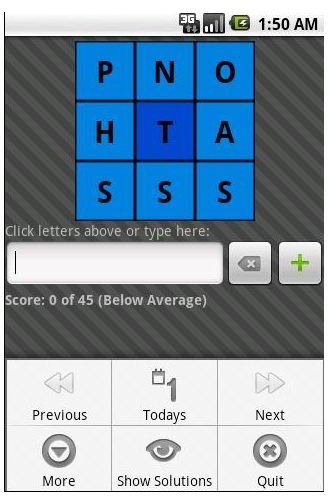
The aim of the game is to make as many words (each word should contain at least four letters) using the letter in the center of the 3x3 grid and one (or more, depending on the combination of the letters that you get) that has all the 9 letters. This game is a version of the word puzzles that are offered in various dailies across the world under different names.
What’s great about WordCube is that it lets you post your scores on Twitter! If you have friends playing WordCube, you can post your scores on Twitter and boast about how good you are when it comes to word puzzles.
You can play a demo version of this game at stealthcopter.com to decide whether you like it.
User Interface and Design
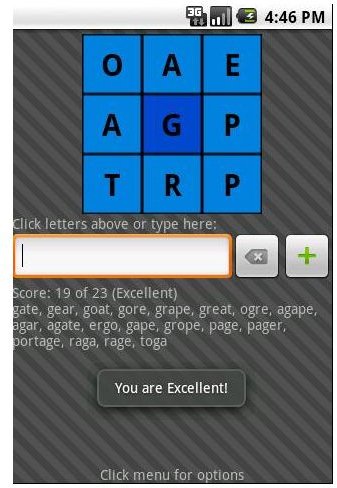
The user interface of this game is very simple. It has a 3x3 grid that shows you the letters and you have to use them to play the game. Below the grid is a text box that lets you add the words. Right beside the text box are two buttons, one that acts as a backspace key and the other that is used to add the words.
The main menu lets you choose the next and previous cube (or grid of words) and also it has a new grid of words that is updated everyday. There should be enough word grids to choose from that you can keep playing until you are satisfied, but this is best as a daily puzzle so this app has great longevity.
System Requirements
The WordCube Android app runs on all versions of Android that are greater than Android version 1.5, therefore this app can be considered to run on almost all the Android phones out there and you should have no issues installing this app. The WordCube app takes just 108KB and should install in seconds even if you have an average connection to the Internet.
Final Verdict
WordCube is not the toughest of word games out there, although it depends on the letters you get and how good your vocabulary is. What makes WordCube so special is that you can play it while waiting for your friend, use it to fill all those one or two minute gaps when you are alone and get bored. It is also a really good game for kids under ten who will find games like WordCube interesting. Not only will it keep them entertained, but it will also help to build their vocabulary.
References
- WordCube at Android Market
- Stealthcopter.com
- Screenshots supplied by Android Market – copyright remains property of the developer.


