Mobile phone platform manufacturers have finally recognized the need for voice-activated features and in the last few weeks Apple and Android have both launched new tools. But which is best, Voice Actions for Android or Siri on iPhone?
You’ve probably heard all about Siri, the new voice activated search and help tool for iPhones. Available with the iOS 5 update , Siri enables users to search the web, set reminders and generally act in a useful manner.
It even lets you have a conversation with it, although the results of this can turn out to be far more mundane than speaking to a computer has any right to be!
Of course, voice tools are nothing new in mobile phones. Android has Voice Actions, a tool for sending text messages, requesting maps and directions and opening web pages without having to type; meanwhile Windows Phone also has voice functionality.
However, Voice Actions for Android and Siri are more widely used, but of the two, which is best?
Strengths of Voice Actions for Android
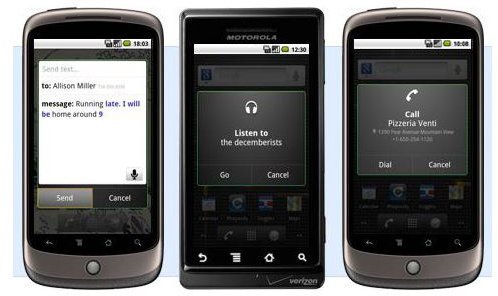
Voice Actions brings a whole new level of usability to your phone, enabling you to take advantage of various tools and features without stopping to tap icons and keys. While useful just walking down the street, Voice Actions for Android are particularly useful while you’re driving. The benefits of being able to bring up a map of the local area or get directions to the restaurant you’re supposed to be paying a visit to are considerable, and as long as your phone is safely mounted on your dashboard all you need to do is enable Voice Actions for Android for this to work.
Naturally, searching for maps and directions occurs via Google Maps, and the power of the search giant is also brought to bear on other features of this voice command technology. It is a simple matter to call your local pet shop store by saying “call” followed by its name and town, just as it is easy to call your contacts, text or even email them.
Voice Actions commands each depend on your use of particular keywords to define the instruction. For instance, to listen to music, you would begin with “listen” and then state the name of the act. Meanwhile, to find a web page, you would say “go to” and the say the website name.
Available for Android devices running 2.2 Froyo or later, Voice Actions for Android is a great enhancement to your device. Naturally, it wouldn’t be possible without Google providing the answers, and as such requires you to be connected to your mobile Internet or a local Wi-Fi network to get results.
Is Siri More Advanced?
With the Siri tool – currently only available on brand new iPhone 4S models – the story is similar, with some interesting enhancements.

To begin with, Apple doesn’t have its own search engine to syphon results from, so the answer here is for Siri to use Wolfram Alpha, the answer engine developed by Stephen Wolfram and launched in 2009. Checking the weather or finding specific information via the Siri app is made possible thanks to this search engine, which understands actual questions rather than the search terms that users might input into Google.
For finding information about places to visit, Siri refers to Yelp.com, and the tool is just as good at finding financial news about a specified company as it is at giving you directions.
Siri is particularly superior when it comes to verbal instructions, however. For instance, you can instruct your phone to call people, send emails or text messages just as you might with Voice Actions for Android, but with Siri you can also instruct your phone to set reminders that will alert you not only at the right time but the right place, thanks to your iPhone’s GPS.
With Siri you can also schedule calendar appointments and even have a conversation, as pictured here!
So Who Wins?
It’s no wonder that Siri is making headlines around the world, and it’s fair to say that Apple has set the bar for voice command tools for mobile handsets with this app. Voice Actions for Android has some catching up to do to offer the full selection of features that Siri has .
Making a choice between these two excellent voice control features is going to be tricky for anyone coming to Android or iPhone fresh from another platform. If this is you, to get the best idea about which of these voice solutions is best for your purposes, ultimately you will need to try each of them out for yourself.
Of course, don’t let voice commands overshadow your choice. You might not ever need to issue verbal instructions to your handset, and for many users a tool like Siri or Voice Actions for Android is nothing more than a useful optional extra to be appreciated but never used.
References
- Siri image credit: http://www.apple.com/iphone/features/siri.html
- Author’s own experience.
- Voice Actions for Android image credit: http://www.google.com/mobile/voice-actions/


