How much would you love to have your favorite Android app running on your Windows PC? If you ever thought that it was impossible, think twice. BlueStacks has now made it possible to run your Android apps on your Windows PC. Give it a go right away!
How many apps do you run on your Android phone? Do you love being a part of the Android app world? Can you go a day without using a really amazing Android app? Would you miss playing Angry Birds? Or some killer app that you just need for some daily task? What if you lose your Android phone? (God forbid!)
The solution is here and it is called BlueStacks . Right now, it is in the alpha stage and is not available for everyone. You will have to ‘Like’ their Facebook page and you will have to wait for a while before you can install BlueStacks. Since the product is still in Alpha, the developers don’t think that it is ready (stability wise) for all users to download.
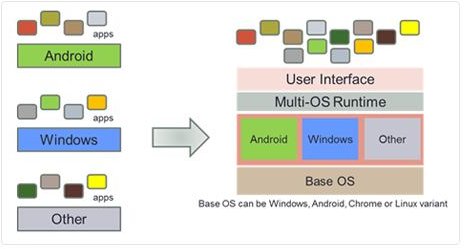
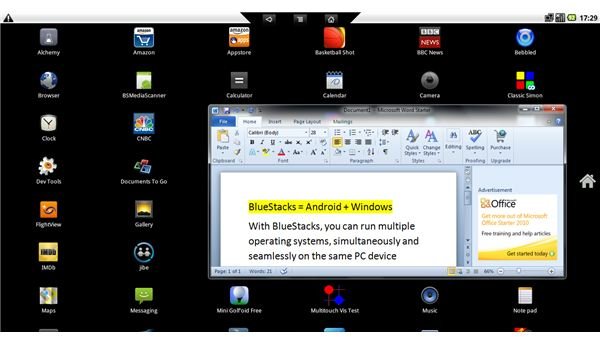
Looking on the brighter side, you can run BlueStacks on your Windows PC, just like you run any other application on your Windows XP (or any other version of Windows after Windows XP), and get the best of both worlds (Windows and Android). You can seamlessly run Android apps and the additional benefit is that you can have the entire Android app ecosystem running on a huge screen (depending on the size of the display that you have, of course). BlueStacks is rightly called Windows + Android!
Best News of the Year for Developers
The good news is not only for the Android app lovers out there. Developers have a good reason to rejoice too. Developers now know that their Android apps are not restricted to the Android ecosystem alone. The millions of PC users who have never had a chance to use an Android app can now have a go. This will give a real boost to the potential market for developers who can now have users running their apps on Windows machines too.
A Post-BlueStacks World
Now that BlueStacks has enabled you to run all your Android apps on your Windows PC, how long do you think it will take for them to make Android apps run on your smartphone running on a Windows OS? Only time will tell that. But if that really happens, there will hardly be any difference between using a Windows phone and an Android phone (only if you are an avid app lover, otherwise it depends on which phone you really love).
Now that Android apps can run on your Windows machine, this could also spell trouble for the Chrome OS. The Chrome OS is the totally cloud centric OS from Google. It looks and feels like Google Chrome. If you are new to the term cloud-centric or cloud OS, in short it means that all the data is stored on a secure server online. The OS is useless if you do not have an Internet connection. The Chrome OS is riding on the popularity of Google Chrome and is trying to integrate Chrome and Android. The major attraction of Chrome OS is again - apps. If people can have their apps running on Windows, who will go for Chrome OS (which is in its infancy right now)?
BlueStacks clearly has the potential to be a real game changer but much will depend on the price and that’s yet to be announced.


