Here’s how you can install Android 2.3, also known as Gingerbread, on the LG Optimus One P500 using an Android 2.3 CM7 ROM and a recovery image.
The LG Optimus One is one of the best Android phones which can be had on a budget. It is priced very well, has decent hardware specs and comes with Android 2.2 Froyo, compared to other budget Android handsets which come with ancient versions of Android like Android 2.1 and Android 1.6.
What’s even better about the LG Optimus One, is that LG has announced that it will be coming out with an Android 2.3 Gingerbread upgrade for it, which makes it one of the few Android phones to have that distinction. The Android 2.3 upgrade should roll out in a few months, but for those restless souls who want to try it out on their Optimus Ones right away, here’s a tutorial which will explain how you can install Android 2.3 Gingerbread on your LG Optimus One, by yours truly.
The superb hacker community over at XDA has already baked a version of the Android 2.3 Gingerbread Cyanogen Mod 7 ROM to the LG Optimus One.
It is still quite buggy, but it now has most of the stuff working quite well. It has the original LGE Kernel 2.6.32.9 and is based on Cyanogen Mod 7. The camera, GPS and radio don’t work as of now, but keep checking the XDA thread for ROM updates, and you should be good. Also note, that you need a rooted LG Optimus One with root access to flash ROMs.
How to Install Android 2.3 Gingerbread Cyanogenmod 7 on LG Optimus One P500
Download the Android 2.3 Gingerbread CM7 ROM for LG Optimus One. Here are two download links for that
Download Android 2.3 Gingerbread Cyanogenmod 7 ROM for LG Optimus One - Download 1 | Download 2
Connect your phone to your PC and copy the ROM to the root of your SD card.
Download flash_image.zip and a recovery image for the Optimus One from Android Forums .
Copy the flash_image and the recovery image to the root of your SD card too.
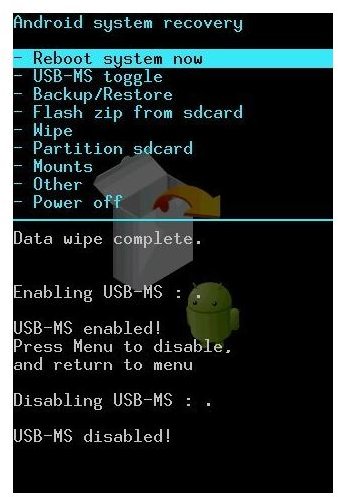
Follow that tutorial on Android Forums to boot into recovery mode on your Optimus One.
Remember to take a backup of the existing ROM using the Backup option.
Once you have booted into recovery mode, select the Flash ZIP from SD Card option and select the Android 2.3 Gingerbread ROM. Flash it on your LG Optimus One.
In a few minutes, your LG Optimus One will reboot and it will be running Android 2.3 Gingerbread Cyanogenmod 7.
If the flashing doesn’t work, you can restore to the earlier backup.
Note: This ROM is an experimental one, so use it at your own risk. If you can wait, wait for the official Android 2.3 upgrade, it will be much safer. For any doubts and queries, hit the official XDA thread .
Sources and References: XDA , Android Forums


