The Leave It On application ensures that your BlackBerry backlight doesn’t shut off just when you need it the most.
Most of us have been in a scenario when we needed the BlackBerry backlight to work for an extended period of time. One way to accomplish this is to navigate through all your mobile settings and change the Backlight Timeout option. However not only is this extremely time consuming, it will only work for a maximum of two minutes and hence won’t be of much help.
The Leave It On app lets you take control of your BlackBerry Backlight and overwrites your default backlight time settings. It can be extremely useful in situations where you are accessing applications such as Google Maps, Music Player, Web Browser, and the BlackBerry Messenger among others.
Overall Usage (3 out of 5)
Once I installed the application, a cute little light bulb icon got installed into my Downloads folder. I clicked on the icon and came across the application screen where a number of options were waiting to be configured.
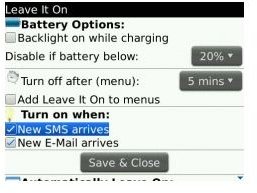
The screen was divided into different options, which I configured accordingly. I then tick marked the “Backlight on when charging” option, entered 20% in the “Disable if battery below” and entered “20 mins” in the “turn off after" (menu) option. I also selected the “Turn On” option for receiving new emails and sms.
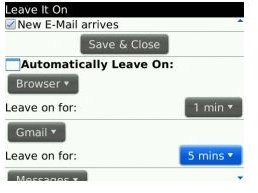
On further scrolling down the menu, I realized that you could also configure the backlight according to applications. I proceeded to test this option by selecting “Address Book” from the drop down menu and then entered “15 mins” in the “Leave on for” option.
After saving all the settings, I went back to my homescreen and accessed my Address book. I left it open and it sat idle for 15 minutes without the backlight ever dimming.
When I clicked on the menu (BlackBerry Key) while I was one my homescreen, the “Leave It On” was right there at the drop down menu. As soon as I clicked it, the backlight didn’t turn off. Then I clicked the “Leave it off” option and the Backlight worked according to the default BlackBerry settings.
Since I had selected the “Turn On” option for receiving new emails and sms, every time I received a message, the screen did turn on automatically.
Final Thoughts (4 out of 5)
The Leave It On application is a nifty way to make sure that the backlight doesn’t die on you, just when you need it the most. The application provided uninterrupted backlight without any glitches and is well worth its $2.49 price tag.


