There will be times when you’re viewing a webpage or streaming media on your BlackBerry and your WAP service just can’t handle it. This is especially true if you are not using a BlackBerry 3G phone. If you are stuck with Edge it may not be enough - you need to connect to Wi-Fi on your BlackBerry.
Wi-Fi Setup Wizard
In order to be able to connect to Wi-Fi on BlackBerry smartphones, you will first need to establish an available Wi-Fi signal and the easiest way to do this entire process is with the wizard. To find the wizard, select the menu key from your BlackBerry home screen to enter the menu options page. Within this menu, you will find the Setup icon which resembles a green gear or cog on a folder.
Within the Setup menu, you will find four icons with the setup wizard being the first and the setup Wi-Fi being the second. You will also see the setup icons for email and Bluetooth but this article is focused on how to connect Wi-Fi on BlackBerry smartphones so we won’t be getting into the email and Bluetooth set up here.
Locate Available Wi-Fi Networks
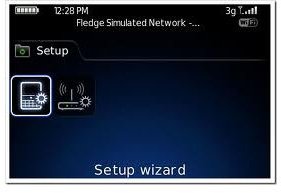
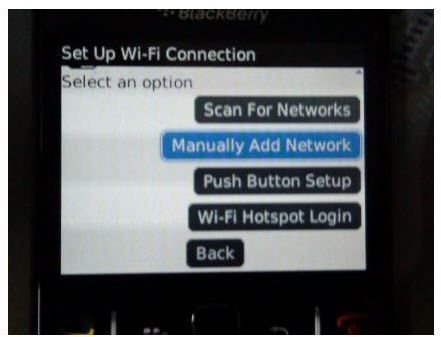
You can access the Wi-Fi setup from inside the Setup Wizard which is the first icon, or you can go straight to the Wi-Fi setup which is the second icon, either one will take you to the same process that needs completing. You will be greeted with a “Welcome to Wi-Fi Setup!” page. Scroll to the bottom and select Next in order to start the process. This will now take you to a set of tabbed options, which includes; Scan For Networks, Manually Add Networks, Push Button Setup and Wi-Fi Login. If you have never done this before and have no idea what the name of the Wi-Fi network is, it is suggested that you select the first option and allow the phone to find the available networks for you.
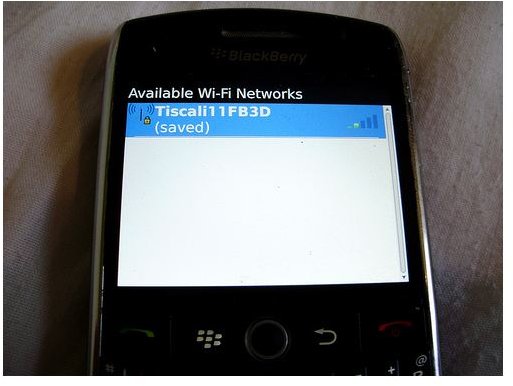
The BlackBerry will perform a search for any available Wi-Fi connections and populate a list when the search is finished. You will also be able to see if the network is locked or open. If it is locked, a little padlock will be displayed beside the name and you will need the network password to get on. Click on the connection that you want and you will be connected.
Protected Setup Routers
Some routers support Protected Setup and if the network that you want to connect to has such a router, you will receive a prompt before you can connect. It will ask you to connect using a PIN. To ignore this, simply press escape and you will be connected to the network without the need to enter a PIN. Once connected, you will be greeted with another screen that shows you the network’s profile name and asks you to save the profile; this is recommended so that you can connect automatically when needed. Scroll to the bottom and select Next. If the network requires you to input a login, you can do that from this screen, if not, just select Finish and you are now ready to browse or stream.
Notes
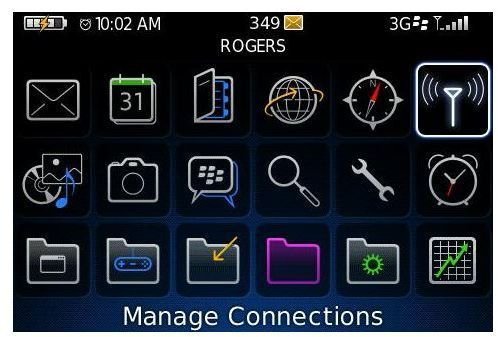
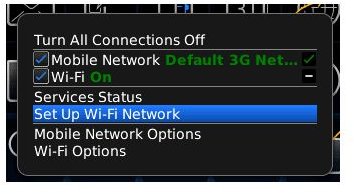
Notes: You will need to ensure that your Wi-Fi service is turned on, what we have done above is to connect to the network, but you also need to ensure that your BlackBerry smartphone is set to utilize a Wi-Fi connection. This process is very easy. Just go back to the Main menu and select the Manage Connections icon which resembles an antenna sending out signals. In this menu, you will see the Wi-Fi option; ensure that there is a tick beside it.


