Good job on adopting a prolific and easily customizable open source content management system: Drupal. If it’s good enough for the White House - the same should be said for you. Creating custom pages is not a daunting task. Follow the method below, and you’ll soon be creating a Drupal custom page!
Making a Custom Page in Drupal
The cool thing about Drupal is that there are numerous ways to tweak your site and create custom pages. Regardless of whether you plan on creating a custom homepage or simply need room to expand - the process is the same.
In this guide, we’re going explore the process of setting up a custom page using the page.tpl.php protocol.
This is a great way for experts and newbies alike to expand their knowledge about one of the world’s fastest growing open source platforms.
Use the following steps for seamless Drupal custom page creation:
Step 1 - Custom homepage theme
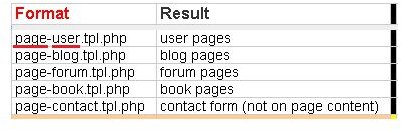
What does page.tpl.php mean? Drupal essentially gives you the ability to create pages using multiple templates, while following a logical pattern. To add in blogs, page.tpl.php may be defined as »> page-blog.tpl.php, or for contact pages »> page-contact.tpl.php.
With this said, let’s look at how you can create a unique front page separate from the rest of your site.
- Copy the current page.tpl.php, rename and start customizing. Of course you don’t have to use the existing template. Heck, start with a new file. The main thing is to rename it page-front.tpl.php. . . Drupal will then use the custom file for the homepage and set all remaining pages to whatever design is on page.tpl.php. Clear as mud? Good.
Step 2 - Custom themes for page groups
Now that we’ve established the basic concepts for creating a custom theme (specifically for homepages), this tip will be more useful if it can be multiplied.
For example, if you think the homepage template will look better on your blog and contact page and you don’t want it on various internal pages, well, there just might be a solution.
- As mentioned earlier, you’ll be directing content to various pages based on the path assigned to a specific template. Check out the below screen shot to see the different possibilities with this method. Note - the customized template will only affect the page itself not the page content. Also, the underlined words in red delineate the group variables needing to be customized.
Fairly simple, wouldn’t you say?
Step 3 - Custom pages for unique users
Now that you’re a pro at creating custom Drupal pages (wishful thinking anyway), it’s time we take things a step further. If custom home and group pages aren’t enough - there’s always another way.
- Let’s say you want to create a custom page for User A and have User B see something totally different. Use the same protocol as before with a slightly different path. Copy the current theme (page.tpl.php), and rename to mirror the new user: page-user-A.tpl. Rinse and repeat.
This is great for advertising purposes, by the way. Different topic for another article.
Remember, there are various ways to complete this task. You can create static pages from scratch using good ole HTML, CSS Overriding…etc It doesn’t matter.


