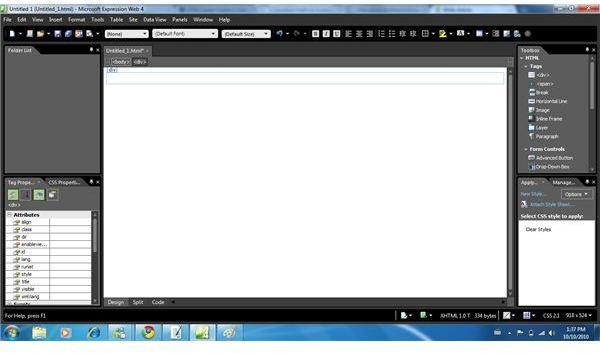
The Internet world has millions of different websites. Those that are left or right aligned look kinda… Well… “Not-so-pretty.” If you find yourself in this scenario, fear not, for it’s easy to learn how to center web pages with Expression Web… And only takes a few minutes too!
Creating A Div
The simplest way to figure out how to center web pages with Expression Web is to create a Div.
To do this, start a new blank webpage. Once the new one loads, find your Toolbox. It is usually one of the panels on the left or right hand side, and provides you with a list of different components you can add to your website.
Look through this list until you find the
Centering The Div
With the new Div created and on your page, find the “Manage Styles” panel. This is usually the bottom right panel in the Expression Web interface.
Select the “New Style” option in this panel and wait for the new window to load. There are a few different selections and customizations you are going to need to fulfill to ensure the web page gets centered.
Enter a name for the Div you have just created and check the box beside it labelled “Apply New Style To Document Selection.” Ensure that the CSS you are
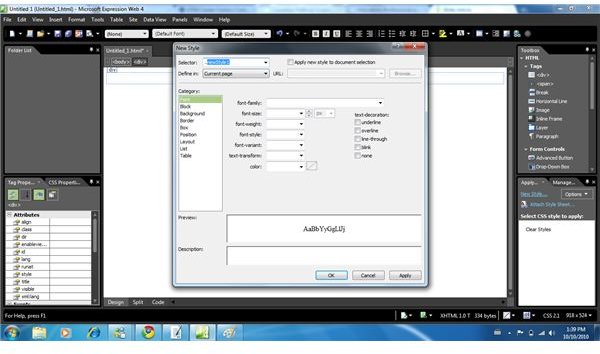
working with is in the .CSS field, then direct your attention to the “Position” tab in the window.
Click on this tab and you will be presented with various fields where you can define the height, width, etc. You must set a width for the Div you just created, preferably 800.
You will also need to set the height, which is yours to determine. Just remember, the height you put here will be the height of your web page; so ensure it is large
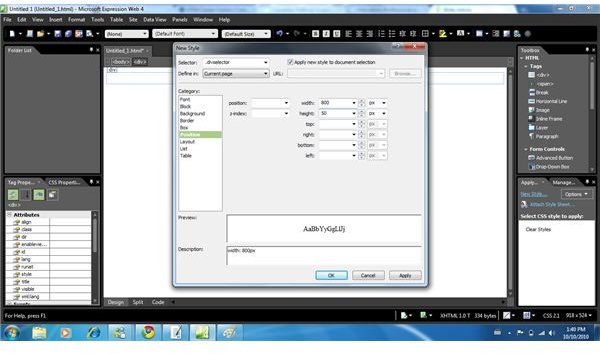
enough length wise.
Once you are done defining these fields, find the “Box” tab. This provides you with padding and margin options. A margin is needed to center the page. For the top and bottom, select “0.” For the left and right margins, select “Auto” from the drop-down list.
Click “Okay” and wait for the window to close.
Now You Know How To Center Web Pages With Expression Web!
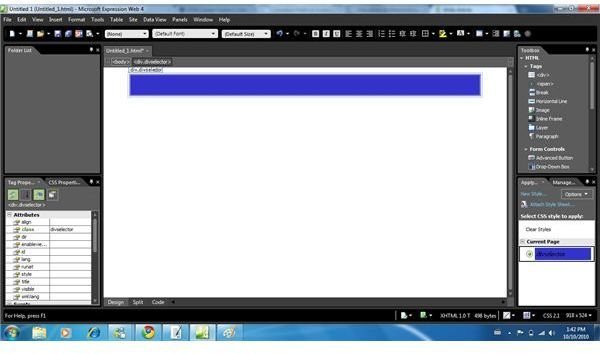
As you can see, the process is quite simple to perform. It just requires a little bit of maneuvering and patience.
Once you have the Div setup, you can start creating your website as you normally would; just ensure all components are within the Div. Before beginning though, it is an excellent idea to test the work you have just completed.
Click the “SuperPreview” feature to view the Div you created in your default web browser. Remember to change the background to some color to see it!
Doing these steps takes just a few minutes to complete and will help ensure your web page looks as flawless as ever.

Using LastPass to Keep Passwords Safe
Still writing your password on sticky notes? Do you use the same password for multiple sites? Why not use a password …

Installing and Using Ablock Plus
Do you have a limited data cap for your internet connection or are tired of seeing endless ads on your computer? …

Ad-blocker Versus Facebook – the Fight for User’s Rights
Adblock Plus is obviously having an impact on Facebook’s revenues as Facebook recently changed the way they code ads on …