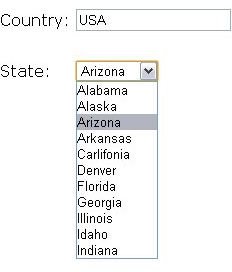
You do not need to put your users through awkward situations when filling online forms with address information. With a JavaScript dropdown states list, you can take a load off your users’ backs and give them a more pleasant experience.
Introduction
It is well obvious that you can easily create a drop down list using HTML, so why would we want to use JavaScript to create dropdown lists rather than using HTML? The best reason would be that you would probably want to dynamically load the JavaScript dropdown states.
In this article I will be showing you how to preload JavaScript dropdown lists from memory and also how to load the JavaScript download dynamically from a web server. I will also explain when it is the best situation to use either of these two options.
Using Preloaded Dropdown List of 50 States
When preloading the JavaScript dropdown list of 50 US states, you will need to generate the dropdown list on a page load. This means you have to statically type the states into the page and hide the dropdown list until needed, or you can wrap the states into a JavaScript function and call them when they are needed.
To simply control your dropdown states using JavaScript, all you need to do is style the dropdown list to be hidden before you use it and give the list an ID. For example:
From a list of counties when the user selects USA, you can trigger a JavaScript function to show the States dropdown list.
JavaScript function:
showStates(){if(document.country.options.selectedIndex = 1) document.getElementByID(‘us-states’).style.display = “block”; else document.getElementByID(‘us-states’).style.display = “none”;__}
The code above checks to makes sure that every time the country is changed it checks whether it is USA and either shows or hides the 50 states.
Alternatively you could load the states in a JavaScript function and load it when needed. In the place you would want the states to appear, you would add this line of HTML code:
Your JavaScript function would look somthing similar to this:
showStates(){
var sStates;
sStates += “
sStates += “”;
sStates += “”;
sStates += “”;
sStates += “”;
sStates += “”;
if(document.country.options.selectedIndex = 1)
document.getElementByID(‘states’).innerHTML = sStates;
else
document.getElementByID(‘states’).innerHTML = “”;
}
Then, you would implement the same country list as above.
Dynamically Loaded Dropdown List of 50 States
This method involves simply loading the placeholder container for the JavaScript dropdown states with the rest of the HTML page. Just like the previous examples, your container would look similar to this:
You would also have a dropdown list of countries like the one used in the previous examples.
You would then use Ajax to load the dropdown of the states using a simple function similar to this:
showStates(){
var xmlhttp;
if (window.XMLHttpRequest){ xmlhttp=new XMLHttpRequest();}
else if(window.ActiveXObject){
try{xmlhttp=new ActiveXObject(“Msxml2.XMLHTTP”); }
catch(e){
try{xmlhttp=new ActiveXObject(“Microsoft.XMLHTTP”);}
catch(e){}}
try{
var url = “file/to/process/states/on/server”;
xmlhttp.open(“GET”,url,true);
xmlhttp.send();document.getElementById(“states”).innerHTML=xmlhttp.responseText;}
catch(e){ }}
The file on the server would handle loading of the data for the state drop down. It could be a server-side file that links to a database to pull out his data dynamically and serve it back to the user.
Dynamic vs Preloaded Dropdown Lists
Preloaded JavaScript dropdown lists should usually be used as they give a better user experience and are not affected by slow connections during filling of HTML forms. There are cases when you would want to load the data dynamically. One example would be in a situation where the user may want to load the states in a secondary language. You could also use it when tracking usage trends and collecting usage statics or various kinds or even load the JavaScript dropdown states based on user history.
Check out this article on how to use ASP.NET’s DropDown List Controls as well as this article on for more information.