Curious as to why you have an entire drop-down menu of “Components” in Joomla? Are you curious to learn what a component even is? You’ve come to the right place! This article will explain Joomla components and teach you why they’re important, helping you to become a Joomla pro.
What is a Joomla Component?
Component (n) (constituent, element) An artifact that is one of the individual parts of which a composite entity is made up; especially a part that can be separated from or attached to a system. “spare components for cars”; “a component or constituent element of a system” (cite: Princeton.edu ))
So, by looking at the dictionary definition, it’s fairly safe to guess that a component is part - or several parts - of something bigger. In Joomla, a component is part of your website that can be added, changed, altered, and removed easily. Now, I know you’re saying,
“Wait a second, that sounds a lot like a module!”
And I agree with you - but look at it this way: A Joomla website requires at least one or two modules to function properly (normally this being the header and the body content, or the body content and a menu) while all components are fully optional.
So You’re Telling Me Components Are Just Optional? That’s It?
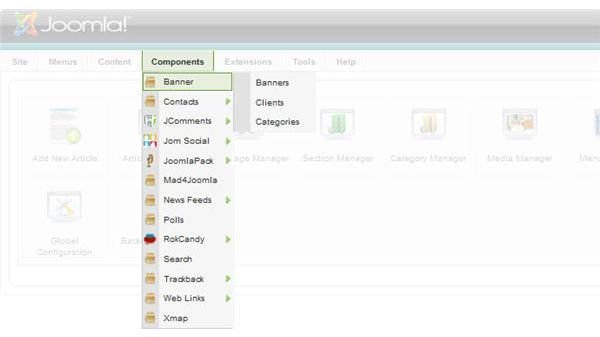
Well, no. Not quite. A Joomla component is also a slightly-more-complex plugin or extension that is large enough that it can use its own configuration page or pages. This might sound a little confusing at first, but lets make it a little easier by exploring one of Joomla’s built in components, the Banner Component. To find this, you simply go within the Components menu in the top bar, to the “Banner” subfolder. Here you can see that there are three more folders on the flyout that read Banners, Clients, and Categories. These all allow for extensive management and organization of banners for advertising.
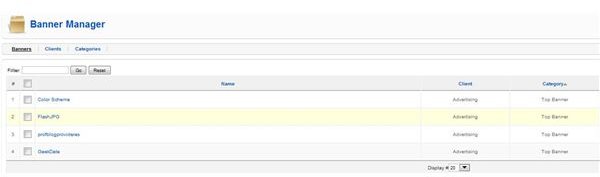
Peeking inside the “Banners” option you can see that I have four banners set up within “Advertising” as my client. For the Category, I’ve set “top banner” which helps me to remember that all of these banners would be displayed at the top of my website. The Banner component also has the ability to remove a specific banner once a certain number of clicks or views of the banner has been achieved - something that would be nearly impossible with just a basic extension.
This component of Joomla allows you to manage an aspect of your site from within its own menus, allowing for a complex display or process to be preformed with minimal effort. If something needs changed, you simply change the one thing that’s wrong with it, rather than going within a plugin itself and changing complex settings or recoding custom HTML.
Why Use Components?
To sum it all up, you’re going to want to use components to handle tasks that normal plugins and extensions might not be able to. And if you’re wondering - yes! A lot of extensions you download will be Joomla components! Especially complex extensions such as calendar extensions , social networking extensions, and all those cool extensions that handle comments within a website or blog!
Image Credits
All screenshots within this article were taken by Amber Neely and are intended for educational purposes only.


