Have you moved your website or web page to another location and want to redirect surfers to that address? Do you want the visitors to your website (or web page) to view ads for a few seconds and then proceed to another web page? Read more and learn how to auto redirect with HTML code.
Before we delve deep into how to create an auto-redirect, first let us understand what auto-redirects are and why they are used. Auto redirect is a technique that automatically takes you to another website or webpage (after a specific period) once you have landed on a web page. If you have been an internet user for a long time, you would have noticed that at times the page is redirected to another webpage after a few seconds. Now let us see why they are used and how to create them.
Auto redirects are used for the following reasons:
-
If your website or some webpages have been moved to another location.
-
To show advertisements.
Advertisement -
To increase the page rank of a particular page in the website that is highly optimised. Sometimes this page has nothing important for the users to see.
-
There is one more situation when auto redirects can be used. They can be used when error pages are encountered. Not many websites have adopted this yet.
Advertisement
Different Methods of Auto-Redirecting:
Creating an auto-redirect is very easy and it can be done in a couple of simple steps. The different auto-redirecting methods are:
1) Auto Redirect using the meta refresh tag:
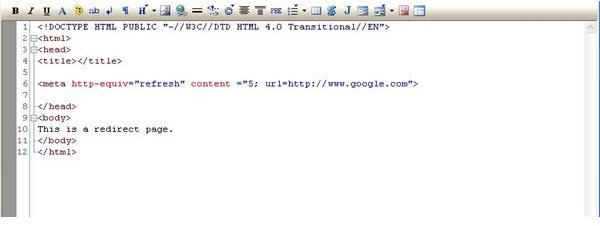
This is the simplest and easiest of all the auto-redirect methods. It is not affected by cross browser issues and it takes just one line of code in the head section of the html page. Create a meta tag with the http-equiv as refresh. In the content parameter, first enter the number of seconds after which the page has to be redirected (I have used 5 seconds in my example). Don’t use 0 (for the time interval) as it auto redirects immediately. The content parameter is followed by a semi-colon(;). The url parameter takes the address of the web page to which it has to be redirected to.
Enter the following code in a text editor or a notepad file and save it as redirect.html (you can save it using anyname but make sure that you have .html as the file name extension)
This is an auto redirect page.
_**
2) Auto Redirect Using Javascript:
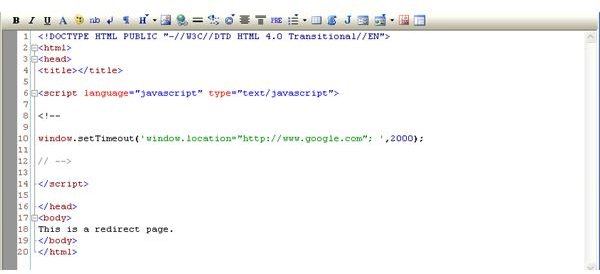
This method is usually avoided as many people do not have javascript enabled in their browsers. In this method, a timeout function is used to execute an operation using the window.location object. The window.location takes the value of the url address to which the webpage has to be redirected to after a specified number of seconds. The time is specified in milli seconds. In this example a timeout of 2 seconds (2000ms) is specified. Use the following code in your webpage and instead of https://www.google.com enter the website address that you want the user to go to.
This is an auto redirect page.
3) Using PHP:
The header redirect function (which is provided by PHP) is used in a webpage to redirect to another location. Include the following code in a text editor. Save it as redirect.php (you can give it any name you want). Once you open the file you will be redirected to google.com.
Warnings:
-
Care should be taken not to use relative urls (to auto redirect) to avoid cross browser issues. Only absolute urls should be used as used in the above examples.
-
Once the page has been redirected, the surfer cannot go back to the page using the back button on the browser.
Advertisement


