CSS font size is used to define specific font sizes within HTML web pages. For the most part, there are two ways to define CSS font size, directly (within HTML), or using an external style sheet (calling a styles only page for use).
CSS Font Size Direct
CSS font sizes can be modified directly within HTML documents. Using this method, there is no need to link to an external style sheet, as HTML and styling are all contained within one document. The best way to understand CSS font size and styling is to learn by example. Review the following styling:
Bright Hub CSS Tutorials
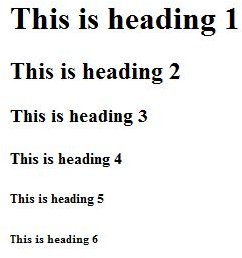
**The above line will create an h1 heading, which is a large font size. There is no need to fill in an exact number for a font when using headings, as they are predefined font sizes. Notice that the tag is listed as “h1”. You can substitute the number 1 for 2,3,4,5, or 6 to use different sized headings. If you were to insert the above code into an HTML document, the result would look like this:
To define actual font sizes for paragraphs, use the following example as a guide:
This is your text output with a font size of 15 pixels.
The above code will generate a CSS font size of 15px. It will also be a black font with some padding. Note when you close the paragraph using the
tag, all font styling stops. If you were to start a new paragraph, you would need to define font styles and sizes again. If you don’t want to use pixels to define font-size, you can use em. An example of using em instead of pixels would look like this:This is your text output with a font size of 15 pixels.
CSS Font Size From an External Style Sheet
The second way to define CSS font size is using an external style sheet. This is a common method of CSS linking used in several css platforms, such as WordPress. Here is an example of CSS font size handled in HTML and an external style sheet:
THE HTML:
This is a CSS Font Size Bright Hub Tutorial
The CSS:
.brighthub {
font-size:11px;
color:black;
font-weight:bold;
font-style: italic;
}
The above HTML will give you this: This is a CSS Font Size Bright Hub Tutorial
Call the external style sheet and link it to the HTML and you will get this: This is a CSS Font Size Bright Hub Tutorial
Basically, the same CSS can be used for direct styling and external style sheet inclusion. However, because an external style sheet is located on a completely different document, you must specify the tags. For this example, we used “brighthub” for the html. In turn, we used .brighthub to match the CSS with the HTML.
More CSS
Just learning CSS?
Be sure to check out the following helpful tutorials:


