This article shows you the basics of the PHP language, including its variables, sample programs, development options, and more.
PHP Tutorials for Dummies
PHP tutorials for dummies can be found all over the Web. But, if you’re interested in programming in PHP, you can’t be all that dumb. PHP is a scripting language used widely on the Web. With PHP, you can process web page forms, search your server’s directories, fetch content from other servers, execute queries on your MySQL database, and more.
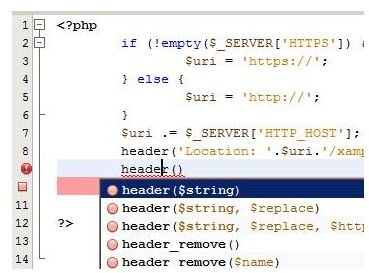
One benefit of developing in PHP is fairly rapid development time–if you have a rich IDE (integrated development environment) with syntax highlighting and PHP library lookups, similar to Microsoft’s Intellisense. Also, PHP is an interpreted, rather than compiled, language, meaning that you don’t have to build the executable from the script. Instead, you hand your script off to the PHP interpreter for execution.
Code completion in a PHP IDE
Set up your development environment
Undertake one of the following two development options to begin coding in PHP.
Option one involves signing up with a hosting company that has PHP. You’ll write PHP code on your computer, upload it to your server, then request the PHP page in your browser to have it executed on the server. Option two involves simulating a server on your computer by using server software, such as Apache.
You can do either option for free. Find a listing and review of free PHP hosting companies here .
To do the server emulation option, first get a free PHP IDE from these sites: NetBeans.org, Eclise.org, or Aptana.org. Then, get a package that includes MySQL, PHP and server software bundled together. Here’s one resource for that approach .
The remainder of this article will assume you’ve set up one of the development environment options just mentioned.
Howdy, Planet
Using your IDE or windows Notepad, paste the following PHP program into your code window:
Save the file as “MyFirstPHPApp.php,” then upload it to your server, (or your simulated server on your hard drive). Open up a browser window on the file you just uploaded, to cause the server to execute the script. Notice the resulting message from the script.
How it works
Take a look at the script’s content, which starts and ends with the “” tags, as all PHP scripts must. We gave the PHP another hint that our script was PHP and not HTML or something else: the filename extension of the script: .php. Be sure each of your PHP scripts has that extension in its filename.
Use Echo for output
There’s little doubt about what the “Echo” statement is doing, but learn a few things about this statement besides its obvious function.
First, you can use other output statements besides echo. Replace that “echo” in the script with this statement: “print.” Re-run the script using the instructions given previously. The output will be the same.
Realize that you could have written “PRINT” or “ECHO,” in place of the lowercase text you typed–but that doesn’t mean PHP is case-insensitive. Try the following example to reveal PHP’s case sensitivity. Replace the code in your script with this code:
"; PRINT "Hail ".$t."! Well met."; ?>Run the script as you ran its previous incarnation, and notice the output: two different statements, coming from two different variables. The variable names are both “T"s, but differ in case. The PHP interpreter would not have printed two different statements if it were case-insensitive. In short, pay attention to case when you code in PHP. Your IDE’s syntax highlighting will help you with this.
Punctuation
Notice the punctuation used in the foregoing script, the period and semicolon in particular. You can probably guess correctly that semicolons are needed to terminate each PHP statement.
Guessing the role of the period might be a little tougher: it’s a concatenator of strings; it joins them together. Compare this with JavaScript’s syntax:
alert (“hello " + “world”);
JavaScript uses the plus to join strings. Be careful if you’re a veteran JavaScript programmer, just learning PHP. Change your pluses to periods.
Variables
Take a look at the variable assignment statements in the foregoing script. If you sense there’s something missing, you’re right. The variable declarations aren’t there. In PHP, you don’t have to declare variables; you can just start using them. A variable comes into existence when you assign something to a token. That assignment looks like this:
$x = “stuff”; or $x = 2;
The PHP interpreter is smart enough to treat the variable as it should be based on its type–be it integer, floating-point number, string or some other type.
Read more about PHP variables here .
Creating HTML content
If you look back at the script with the PRINT statement, you’ll notice a tiny bit of HTML in one of those statements: “
.” This statement is a hint that you can use PHP to display any HTML content. Try this example:
Here's some formatted text.
"; echo ""; echo "