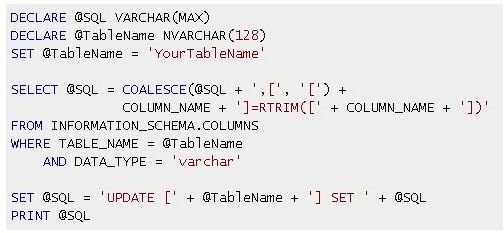
The SQL RTRIM function is a little function with a small name that doesn’t seem to have much going for it. That is not exactly the case. As you read on you will begin to understand the roles RTRIM plays in SQL.
What is SQL?
Structured Query Language, more popularly known as SQL, is a language that is designed to help manage data stored in relational databases. The language is a based on a series of English-like commands and statements called queries which are executed by the database engine in a relational database management system. SQL queries hold a series of commands, clauses and functions based on reserved keywords and RTRIM is just one in many functions available in SQL.
Basic Syntax
Without diving too deep into the details of SQL queries, the basic form of a SQL statement for retrieving data from a database is as follows:
SELECT [DISTINCT] column_names FROM table_name [WHERE] criteria
Where the SELECT is the command and the rest of the query instructs the database engine what to retrieve and where to retrieve it from based on a criteria. The keywords enclosed in square brackets are usually optional and criteria is a character expression based on the table and its column. A SQL SELECT statement can more more complex than shown but for the purposes of this tutorial keeping it simple will work will work quite well for us.
Syntax
The RTRIM function has a very simple syntax in the form of:
RTRIM(character_expression)
character_expression can be a constant string, a variable, or column of either character or binary data as long as it can be evaluated as character data. The return value is a varchar data type.
Usage
So what exactly does this function do? RTRIM, as used in SQL, basically strips off all white space or blank characters in other words from the end of a character string or any data type that can be evaluated to a varchar in SQL. You can change a character string stored in your database like “This is a string with space at the end “ with trailing white space and without the double quotes into the following “This is a string with space at the end” using the RTRIM function.
Assuming the string just mentioned is stored in a column called string_column in a table named table_name, the statement to retrieve the string with the output described would look something like this:
SELECT RTRIM(string_column) FROM table_name.
This SELECT query simply extracts all the rows of data in string_column while performing a check on each row ensuring it strips off all the blank spaces at the end of the string before returning the result.
RTRIM does not have to be used exclusively on tables in a SQL database. It can also be applied as a stand alone expression in your database application. Looking at the Syntax below,
SELECT RTRIM(‘This is a string with space at the end ‘);
The expression simply operates on the string literal passed into the function as an argument and return the same string stripped off all blank characters.
Significance
This SQL function may seem simple and may seem to have a single distinct use. Even though that is true, the nature of its work makes this a very powerful function. Generally allowing different users to insert data into a database may cause problems. Looking at one particular problem such as allowing users to enter their name. It may so happen more often than note that you will have names entered into the database with trailing spaces. This would be the ideal function to use to strip those spaces when entering the information. Such a syntax would be appropriate for the job.
INSERT INTO table (name_column) values (RTRIM($nameVariable);
How about you inherit a table with a column already polluted with strings containing white spaces? You can simple do a one time data correction with a query in the form of:
UPDATE table SET name_column = RTRIM(name_column)[, col2 =RTRIM(col2)[, col3 =RTRIM(col3)[…]]]
Remembering the square brackets are optional.
You can also test for black values in your table using:
SELECT string_column WHERE RTRIM(string_column) = ‘’
The RTRIM function has two relatives that work exactly the same. These are LTRIM and TRIM. LTRIM strips all blanks spaces at the beginning of the string and trim strips all blank spaces at the beginning and the end of the string.
The Oracle Syntax
Popular relational database management systems such as Oracle, SQL Server, MySQL, PostgreSQL, IBM DB2, MariaDB and SQLite, among others, all support the standard syntax. Oracle provides for an additional syntax that allows it to not only strip the white space at the end of the string but basically any character that you specify. The syntax for the Oracle syntax is as follows:
RTRIM(mySring, [trimString])
The function removes the individual occurrences of every character found starting from the end of trimString until it finds no more. Look at these examples.
RTRIM(‘123xxx’, ‘x’) returns ‘123’
RTRIM(‘Stringabcabc’, ‘xyz’) returns ‘String’
RTRIM(‘abcStringabc’, ‘abc’) returns ‘abcString’
RTRIM(‘Stringabcccab’, ‘abc’) returns ‘String’
RTRIM(‘String582’, ‘0123456789’) returns ‘String’
Notice in the third example, the first ‘abc’ characters are left intact. This is because it started stripping from the end and when it came to the ‘g’ it stopped since ‘g’ is not part of the trimString.
There you have it. A simple but yet powerful function you can use in your SQL queries to help you better manage your stored data. The SQL RTRIM function name is in no way case sensitive. So using all lowercase letters will provide the same results. It is all a matter of preference.
References
- Oracle database documentation
- Micrososft Developer Network (MSDN)
- Author’s own eperience
- Screenshot taken by author


