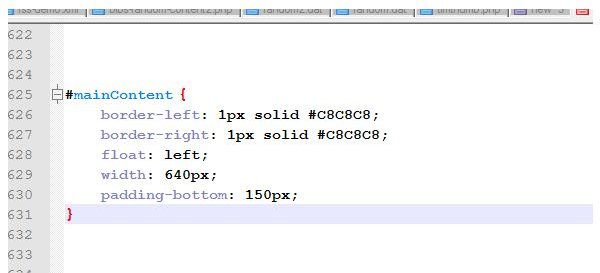
If you need to add additional elements to your HTML and CSS style sheet, begin by making a copy of your webpage and testing it before rolling the change out to a live website! Once you have done, this you will be ready to carefully add instructions for the new DIV element to your CSS.
Always Preview Changes on a Test Site!
Positioning of elements in web design can be tricky for everyone, not just beginners, and it can be frustrating to find that what worked an hour ago no longer looks right. This might be due to an enforced change, for instance.
Adding an additional element to your HTML template and CSS file might resolve this, but making changes shouldn’t be rushed into.
Making adjustments to any web page should be done only with full understanding of what the implication might be, so before adding a DIV to an existing CSS style sheet , make sure you have a test site set up to preview the results!
Things to Consider When Adding a DIV to the Template
Before you can proceed with adding a DIV to your existing CSS style sheet, you will need to identify the element in your HTML code and what behavior you are expecting from it once added.
You might be adding an image or trying to position a specific element; you might simply want to float the element to the right but for the best results, a DIV element will be required rather than old-fashioned align=”right” HTML markup.
For instance if you have an element This is the stage at which you need to ensure that you have made a backup of your files; ideally you should also be working on a test version of your website rather than the live site. With the points above in mind, you should add your new DIV element to your document before adding it to your CSS style sheet. For instance, if we have a passage of text as an introduction to the website that needs to be pushed to the right of its current position we might create a DIV around it as follows: INTRO TEXT[…] With the DIV declared in the HTML
, it should then be added to the CSS file. Ideally, this should be placed in an sensible location; CSS files are easier to browse through when groups of similar or related elements are placed together. To add this DIV element into the CSS, use the following hash convention: #intro {} The styling will be placed between the braces (using the convention “{ styling: this_style; }”) and you might also consider leaving a comment explaining what the element is and when it was added, particularly if you are working on a group collaboration. The final styling for the DIV might be as follows: /*Comment*/ #intro { float: right; } Other CSS styling can be added within the braces; they should be added one per line, but the stylesheet will work as long as the brackets, colons and semi-colons are used. Sources: Author’s personal experience Screenshot provided by writer. Still writing your password on sticky notes? Do you use the same password for multiple sites? Why not use a password … Do you have a limited data cap for your internet connection or are tired of seeing endless ads on your computer? … Adblock Plus is obviously having an impact on Facebook’s revenues as Facebook recently changed the way they code ads on …Adding a DIV to Existing CSS Style Sheets
References

Using LastPass to Keep Passwords Safe

Installing and Using Ablock Plus

Ad-blocker Versus Facebook – the Fight for User’s Rights