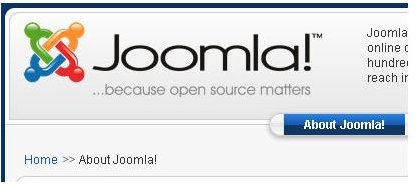
So you now have your Joomla based website up and ready to go live but then again, you notice that you don’t like the Joomla breadcrumbs appearance. What can you do to change it? Keep reading to find out.
What is a Breadcrumb?
A breadcrumb, in terms of web development, is sort of a linear navigation menu that tracks the hierarchy of the page in which you are currently viewing in relation to the Home page. They form quick and convenient ways to access parent information as you browse through a website. The Joomla breadcrumbs appearance may not be appealing to you and therefore this guide shows you just how you can touch up these navigational aids.
Prerequisites
Of course this guide makes the assumption that you are familiar with the Joomla Administrator module. I also make the assumption that you have a working copy of the latest version of Joomla installed and properly configured. If you have not done either of these you will need to go to the Joomla website and download the latest version of Joomla .
Joomla Breadcrumbs Implementation
Joomla implements breadcrumbs as a Joomla Module. Joomla Modules do not give much flexibility in the styling you choose for them. This means that you will have to go directly into the Joomla Templates manager found under Extensions > Template Manager.
Inside the Joomla Template Manager
Doing this will give you a list of the current templates you have in your installation. Click on the name of the active Joomla template and you will be taken to that particular template’s page. On the page on the top right side you will see an icon labeled Edit CSS. Click on it to gain access to the list of CSS files that are found in the current Joomla template.
Select the radio button on the next to the template called template.css then go to the top right of your page and click the Edit icon to gain access to the template source code. Using you web browser search feature, look for the word pathway and search. You should find a piece of code that looks like this.
#pathway {
padding: 0px 10px 8px;
width: auto;
margin-top: -2px;
margin-right: 250px;
text-align: left;
}
To make a simple change, like make all the text uppercase and to turn the current page to red, I have changed the code to look like this.
#pathway {
padding: 0px 10px 8px;
width: auto;
margin-top: -2px;
margin-right: 250px;
text-align: left;
text-transform: uppercase;
color: #ff0000
}
That is all there is to making changes to the Joomla breadcrumbs appearance.
Results
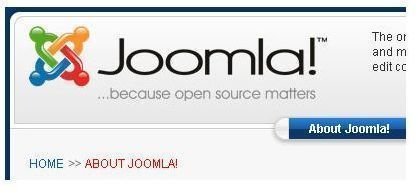
On the left of this text is the result of the changes made to the code. You can compare it with the image placed earlier in the article. The possibilities are endless when it comes to Joomla breadcrumbs appearance changes by just restricting the changes to the CSS based template file.
You can also enhance your Joomla based website by adding Google Maps to your Joomla contact page and also look into more things you can do with CSS like this CSS background image code and try using the tips given there to further enhance the Joomla breadcrumbs appearance.