The Facebook video virus has been hitting computers using very tricky techniques that mess with privacy firewalls. The Koobface Facebook virus prompts you to load flash player and infects your computer from there. Find tips here on how to identify it and
What is Koobface?
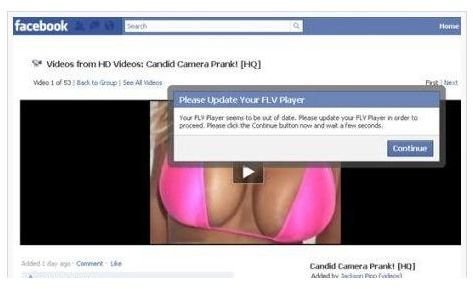
The Facebook video virus, also know as Koobface entices unaware Facebook users with a video attachment. In the message, the virus entices you with either “check out this celebrity video,” or “my friend catched you on a hidden cam,” and even, “Is this you! Hi my Friend!” You may also receive a video that entices you to view it because it actually names the celebrity like Paris Hilton.
When users follow the instructions to download Flash Player, the self-replicating worm Koobface virus infects the computer with malware including web hijackers, ad rotators, social network propagation components, fake antivirus programs and data stealers.
If you see something like the screenshot to the left, your best bet to ignore it, because although it looks like one of your Facebook friends sent it, they haven’t. Some Facebook users also receive accusatory emails from friends who inquire as to why they are sending spam video messages. Because the virus gets into Facebook privary walls, it does indeed look to others like the message came from you.
If that weren’t enough, Koobface also displays Captchas that prompt you to enter codes or letter quickly or else your computer will shut down along with error messages such as “error installing codec.” Others are finding extreme slow times including network and browser searches, popup ads and antivirus programs not previously installed.
Indeed the Koobface Facebook video virus is dangerous and now some experts like PC Tools says it’s also been seen on Twitter and MySpace.
If you’ve been caught unsuspectingly, what can you do to remove the Facebook video virus ?
Removing the Facebook Video Virus Koobface
Many other names have been offered beyond just the Koobface virus, although they are all the same thing. Other names include W32/Koobface, W32/Koobface.AZ, W32.Koofbace and Boface.
To remove the Facebook video virus, there are a couple blogs and websites that offer tips on how to manually remove the virus including:
If you have a good antivirus program in place from Symantec or McAfee, both of these have updates you can install to remove the Koobface video virus.
Some free antivirus programs aren’t setup to remove this virus/worm, however, there are two downloads, one from Spyware Doctor and the other from Malwarebytes . Both will help you automatically delete the virus/worm from your computer. You can also find the best antivirus programs downloads for Windows 7 along with reviews right here on Bright Hub.
Manual removal of the Facebook video virus requires a system restore , so if you don’t know how to do this, it may be best to try one of the free antivirus programs listed here or get some techie help. Facebook is encouraging those who have been infected to change their password, which can be done if you follow the steps under your Account Settings.
Finally, if you’re an avid Facebook user, they do recommend visiting their Facebook Security page often to learn about potential infections and what to do to keep your Facebook account safe and secure.