If you’re thinking of setting up a website or blog with the intention of making money online, you want to first make sure that the niche you’ve chosen is a profitable one. One way to determine this is by employing the Google keyword search tool.
There are many keyword tools out there. Some are offered for free while others require a subscription or the purchase of a software program.
If you’re new to the game and baffled as to which to choose to get started, you can give the free Google’s keyword search tool a try.
Also known as the Google Adwords Keyword Tool, it offers you a quick guide as to the keywords that are frequently searched in your niche. It’s actually a tool offered as a guide for those who want to take up Google Adwords advertising. However, it could be used by webmasters, bloggers and article writers to get an idea of the keywords that are frequently searched in specific niches and the competition for the same.
No registration is needed to make use of this useful tool. However, a Google account will come in handy as will be explained below.
Getting Started
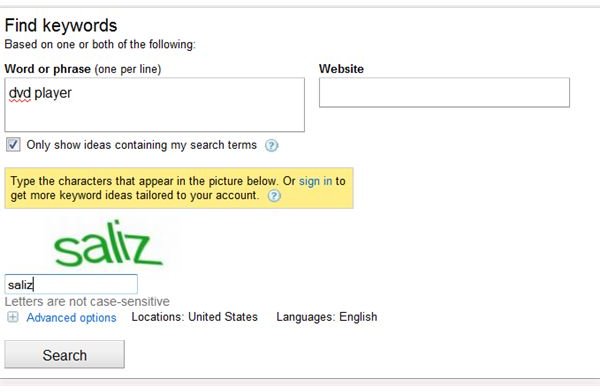
To get started, head to the Google Adwords site and type in a word or phrase in the search box of the Find Keywords panel.
You have two options here. The first is you search the whole Google database for a keyword or you limit your search to a particular website. The second option is useful if you’re studying a competitor website and want to know which keywords are in demand.
Finding Keyword Ideas
Let’s say your niche is DVD Player. You enter the keyword in the word box. The next thing you would do is enter the captcha. When you click on Search, you’ll be presented with the search for results for the keyword DVD player.
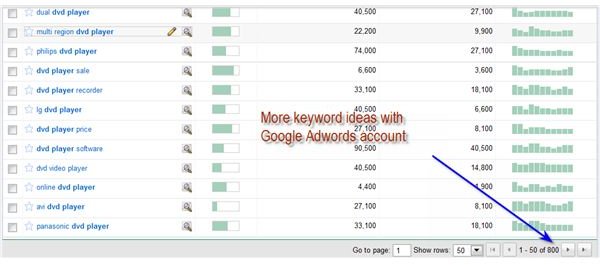
Among the areas you can take note of from the results are global monthly searches and local search trends.
You can activate more options like competition and local monthly searches as will be explained below.
A search in this mode will display about 100 keyword ideas. If you want more ideas, you would need to sign in with your Adword account. This is a quick process if you’ve a Google account. Just sign in with your Gmail account and you’re ready to go.
I searched with the Adword account enabled and the keyword ideas jumped to 800.
Advanced Options
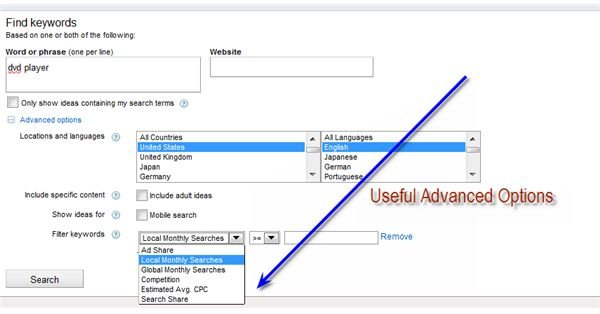
You can really get more out of your keyword search by clicking on the Advanced Options just above the Search button.
Locations and Languages
Under Advanced Options you can set locations and language. If your website is targeted towards a local audience, then you can choose a country of your choice. Otherwise, you can set the option to all countries.
Filter Keywords
The Filter Keywords is the most useful of these options. Under it you can filter your search results according to local/global searches, competition, estimated average CPC (Cost Per Click), search share and Ad Share.
Competition and Estimated Average Cost Per Click are useful if you’re looking towards making money online. You can even add different sets of keyword filters for a single search by clicking the Add another button. For example, you can add competition and average cost per click to the filter keywords section. You can then click on columns to customize the columns and reorder them.
Searching With Filter Keyword Option
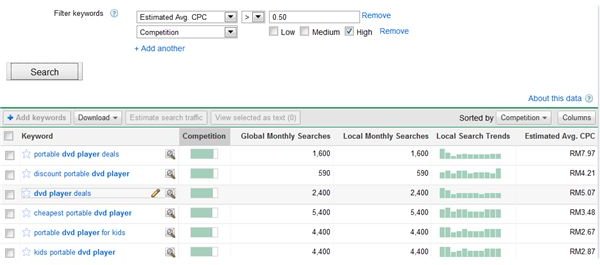
I searched for the keyword `dvd player’ with the filter keywords `average CPC’ of more than $0.50 and high competition and the results are shown in the screenshot below.
I ended up with 91 keyword ideas with good average cost per click.
Download Keyword Ideas
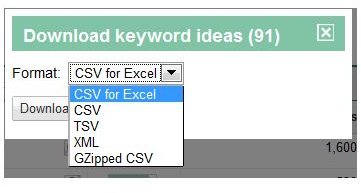
The final step would be to download keyword ideas for future reference. Click on Download and choose Download all. You can download your keyword ideas in a variety of formats, including XML, CSV and TSV, among others.
As a web content producer, you can then write articles or create blog posts around these keyword ideas. This would enable you to make money online via Adsense or affiliate marketing of products related to the keyword ideas.


